Add Nomo from the Claude Code or Codex plugin marketplace
Install the Nomo plugin one agent at a time: from the Claude Code or Codex plugin marketplace, or in OpenCode, Cursor, Antigravity or Devin.
Install once per computer. You need bun or node 18+ — the plugin has no
npm dependencies and runs on Node built-ins. Keep bun at 1.4.4 or newer, and
Node.js 22 at 22.23.4 or newer: the status command warns you about older
ones.This does the same as the one command, one agent at a time. Use it if you’d rather go through your agent’s own plugin store, or if the installer can’t run. Pick your agent:
The desktop app’s built-in terminal works too, if you’d rather type
than click.
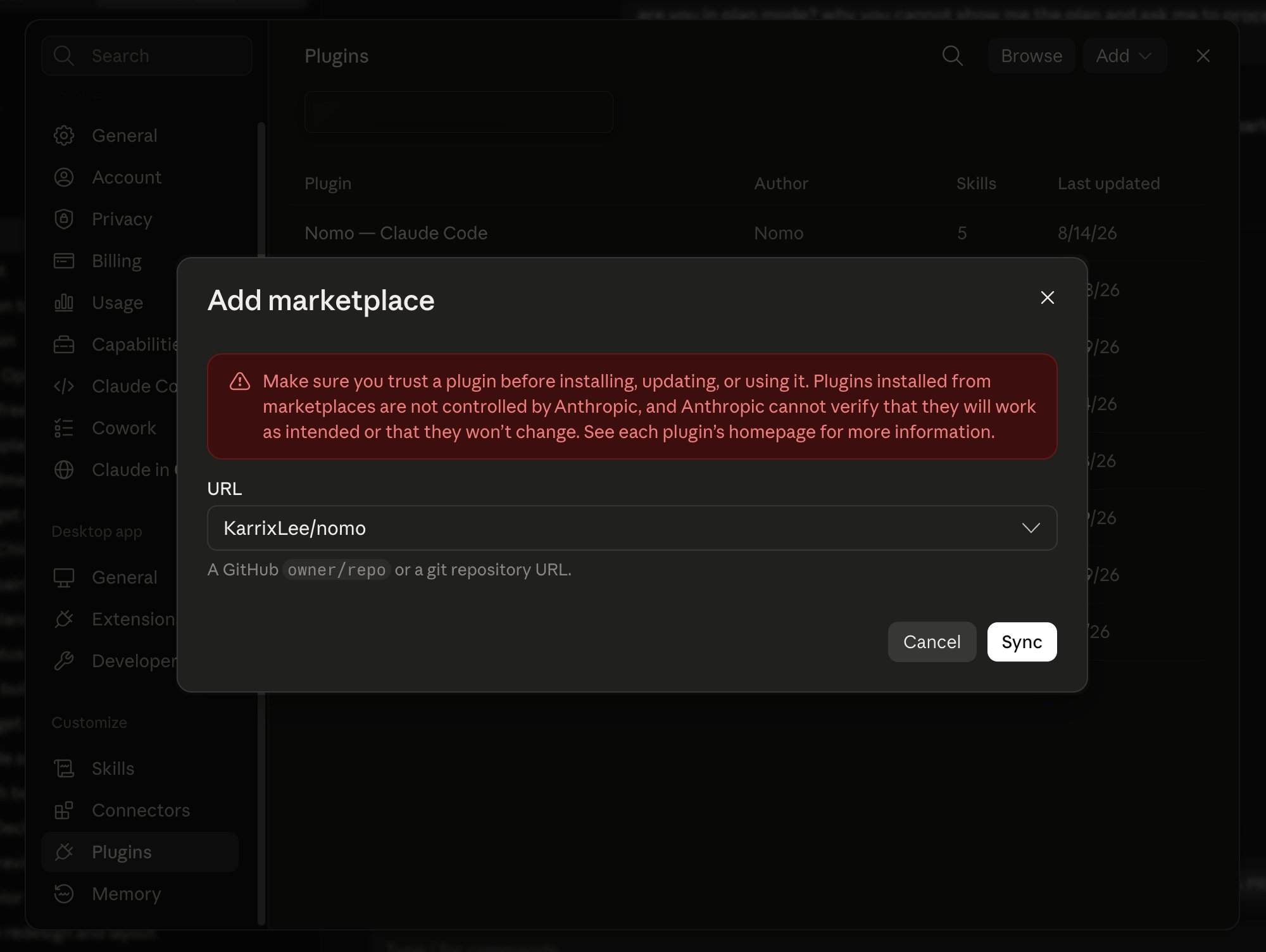
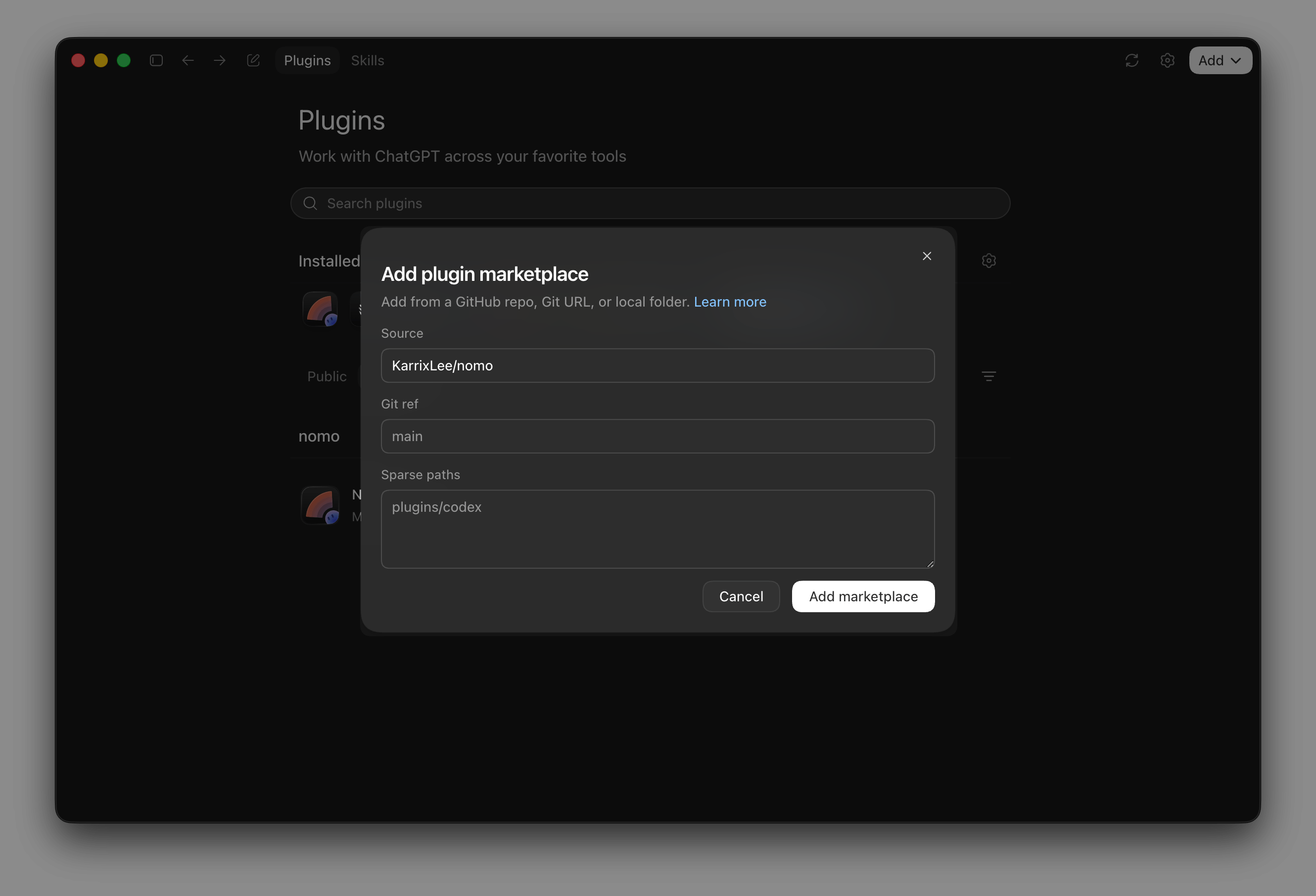
Plugins → Add → Add plugin marketplace. Put the
repository in Source:
KarrixLee/nomo
Leave Git ref and Sparse paths alone — the grey text in
them is placeholder, not a value you need to match. Then
Add marketplace, and install nomo from the list.
Nomo's repository is the marketplace — there's no listing to browse or submit to.
“Marketplace” here isn’t a store you browse. It’s a registry pointed
at a GitHub repository — Nomo’s own. That’s why you add the repo
first, then install the plugin from it.
2
Trust the hooks — required
Terminal
Desktop app
/hooks
Trust the Nomo entries.
Settings → Hooks → Nomo, and turn them on.
Don’t skip this. Nomo’s hooks ship with the plugin but stay inert
until trusted. Until you do it, the plugin is installed and doing
nothing — no sessions reach your phone, and nothing reports an error.
This is Codex’s own safety gate, and Nomo can’t pre-approve it. The hook
command lines are byte-stable across releases, so trusting once holds
through updates — only a changed hook line re-opens the review.
3
Confirm
$nomo-status
This reports pairing, watchdog, hook-trust, and last-delivery health
— so it’s also how you check the trust step actually took.
Codex skills use a $ prefix rather than a slash: $nomo-pair,
$nomo-status, $nomo-reset, $nomo-unpair. All of them are in
Commands.
OpenCode has no marketplace and no plugin command — it picks up whatever it
finds in its own config folders. So Nomo installs from a clone, and one
script puts the files where OpenCode already looks.
Clone it wherever you like — the script works out its own location, so
there’s no path to look up and nothing to hand-edit. It prints exactly
what it wrote:
~/.config/opencode/plugins/nomo.js — a one-line stub pointing back
at the clone.
~/.config/opencode/commands/nomo-*.md — the six commands.
Already installed Nomo for Claude Code or Codex? Point the script at
that copy instead of cloning a second one — claude plugin list or
codex plugin list prints where it lives.
--project installs into ./.opencode for one repository instead of
globally. Re-running is safe, and it’s also how you move the clone:
run it again from the new location.
2
Restart OpenCode — required
OpenCode imports plugins once, when its server starts, and there’s no
hot reload. Until you quit and reopen it, the plugin is installed and
doing nothing. The desktop app runs that same server, so it needs the
same restart.
On OpenCode 2.x, quitting isn’t enough. Run this in Terminal, then open OpenCode (why):
opencode service restart
3
Confirm
/nomo-status
That one install covers the OpenCode desktop app as well: it runs OpenCode’s
own server, which reads the same plugin folder.
Updating later is one command from inside OpenCode: /nomo-update checks
first, then pulls and re-runs this installer —
what it does, and when it refuses.
OpenCode command names are flat and global, so Nomo’s carry no prefix at
all: /nomo-pair, not /nomo-cc:pair or $nomo-pair. All six are in
Commands.
What lands differently on your phone is in
Using OpenCode.
One install covers both the Cursor desktop app’s agent and the
cursor-agent CLI. Cursor sessions are read-only in this version —
Using Cursor has what that means.
1
Run the installer
bunx nomo-ai --cursor
npx nomo-ai --cursor
It does three things:
Clones the plugin to ~/.nomo.
Adds Nomo’s hook entries to ~/.cursor/hooks.json. It merges with
whatever is already there and leaves other tools’ entries untouched.
Installs four skills under ~/.cursor/skills/.
2
Restart Cursor — required
Cursor only picks hooks up when it starts. Quit and reopen Cursor,
and restart any cursor-agent session you have open. Until you do,
the plugin is installed and doing nothing.
3
Pair
In Cursor, type / to pick a skill, and run:
/nomo-pair
It shows a QR code — scan it with the Nomo app. Where you can’t open a
browser, /nomo-pair code gives you a short code to type instead. Both
paths are walked through in Pairing.Pairing is shared across agents on one Mac. A computer already paired
for Claude Code, Codex or OpenCode doesn’t need pairing again for
Cursor — installing is enough, and you can skip this step.
4
Show the Cursor tab
In the app, open the computer. Cursor sessions sit under a Cursor
tab in its session drawer.The drawer shows up to three agent tabs. If Cursor isn’t one of them,
tap the + button (Choose agents) and turn it on.
Nomo’s Cursor commands are skills with no prefix: /nomo-pair,
/nomo-status, /nomo-reset and /nomo-unpair. All four are in
Commands.
One install covers both the Antigravity desktop app and the agy CLI.
Shell commands and file writes can be answered from your phone —
Using Antigravity has the details.
1
Run the installer
Paste this into Terminal and press Return:
bunx nomo-ai --antigravity
npx nomo-ai --antigravity
You should see:
✅ Antigravity is connected to Nomo. Restart Antigravity, then type /nomo-pair.
2
Restart Antigravity — required
Quit Antigravity completely and open it again. If you use agy,
restart it too. Nomo stays off until you do.
3
Type /nomo-pair
In an Antigravity chat, type /nomo-pair and send it. When Antigravity
asks to run a Nomo command, choose Allow. Then scan the QR code with
Nomo on your iPhone.You should see, in Antigravity: “Done! This computer is connected to
your phone.”In the Antigravity desktop app, the first Nomo command may show one line
that says operation not permitted. That’s normal — Antigravity tries
again outside its sandbox by itself. Just wait.Already paired from another agent? Type /nomo-status instead to check.
4
Send a message in Antigravity
Start a chat and send anything.You should see the session appear in Nomo, under the Antigravity tab
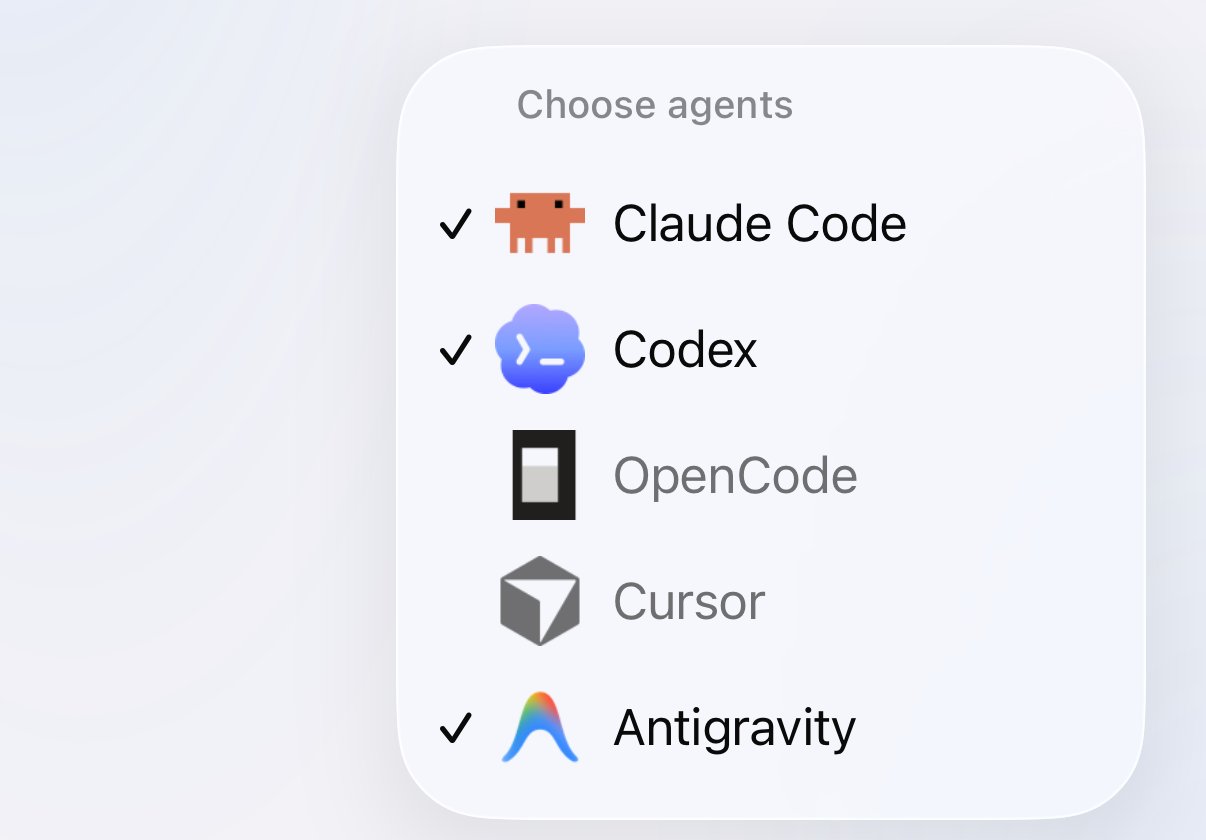
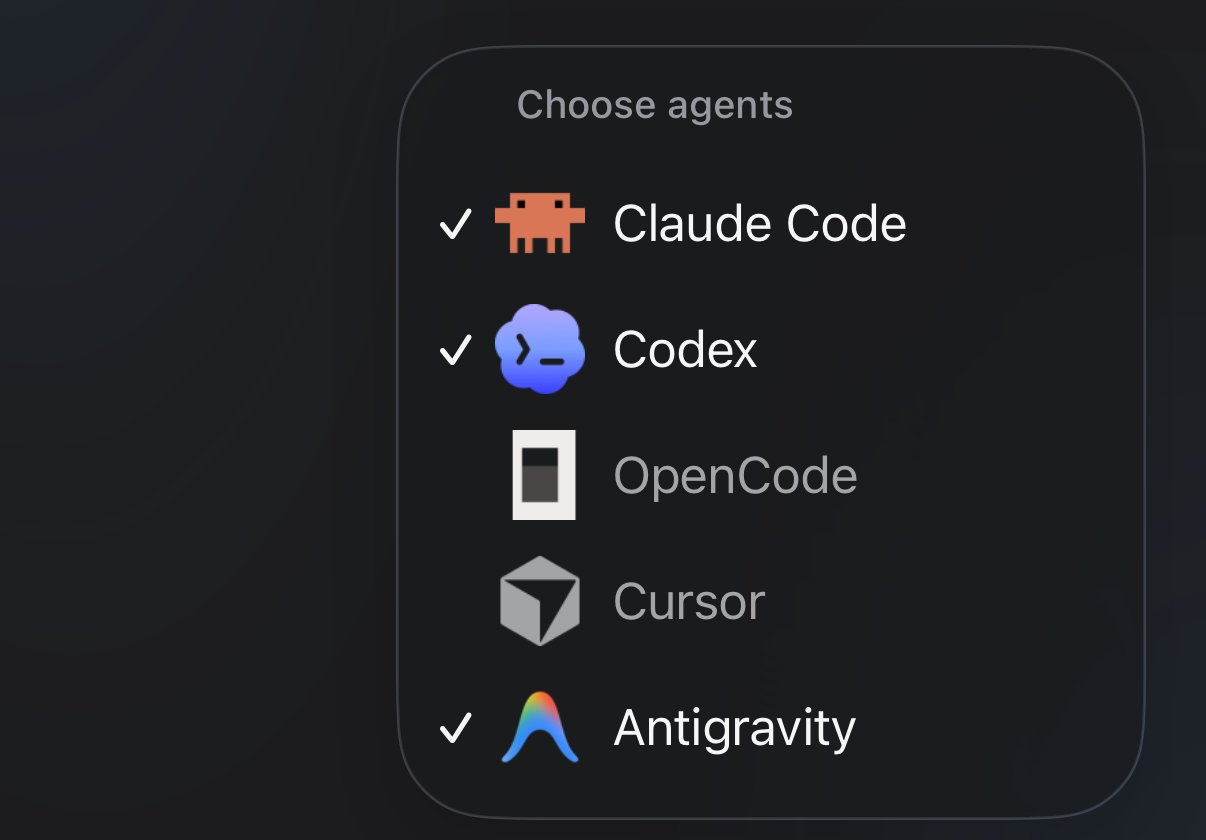
of your computer. No Antigravity tab? Tap the + button (Choose
agents) and turn Antigravity on.
Choose agents, from the + button. Antigravity is ticked, so it gets its own tab.
Don’t import Nomo’s Claude Code plugin into Antigravity (for example with
agy plugin import claude) — every session would show up twice. If you
did, the installer warns you:
⚠️ Antigravity also has the Claude Code version of Nomo ("nomo-cc") imported. It would show every session twice — please remove it by running: agy plugin uninstall nomo-cc
To fix it, run agy plugin uninstall nomo-cc and restart Antigravity.
For the Devin CLI and Devin Desktop. Devin’s permission prompts and
questions can be answered from your phone — Using Devin
has the details.There are two ways to add Nomo to Devin: the Devin plugin, or the
Nomo installer. Install one of them. If you install both, Nomo uses the
installer one, and the plugin stays quiet.No Devin CLI yet? On your Mac, open the Terminal app (it’s in
Applications → Utilities). Copy this line, paste it into Terminal, and
press Return:
brew install --cask devin-cli
No Homebrew? Use this instead:
curl -fsSL https://cli.devin.ai/install.sh | bash
Then type devin and press Return. If Devin asks you to sign in, follow its
steps.
Devin plugin
Nomo installer
1
Install the Nomo plugin
Type this in Terminal, not inside Devin. If Devin is open, open a
new Terminal window first (press ⌘N).Copy this line, paste it into Terminal, and press Return:
devin plugins install KarrixLee/nomo
Using Devin Desktop instead? Go to Customize → Plugins → From
repository, and enter KarrixLee/nomo.
2
Start Devin
In Terminal, type devin and press Return.
3
Type /nomo:pair
In devin, type this and send it:
/nomo:pair
Devin opens a page with a QR code in your browser.
4
Scan the QR code
On your iPhone, open Nomo. Tap Pair your Mac on Home (or
Connect your Mac in Get started). You can also tap + in
Sessions. Scan the QR code.
5
Check it
In devin, type this and send it:
/nomo:status
If a line starts with !, do what the → line under it says.
6
Send a message in Devin
In devin, send anything.You should see the session appear in Nomo, under the Devin tab
of your computer. No Devin tab? Tap the + button (Choose
agents) and turn Devin on.
1
Run the installer
Copy this line, paste it into Terminal, and press Return:
bunx nomo-ai --devin
npx nomo-ai --devin
Among the lines it prints, you should see:
devin-install: Devin sessions will now show in Nomo — restart devin (and Devin Desktop)
2
Restart Devin — required
Close every open devin, then start it again. Using Devin Desktop?
Quit it and open it again too.
Don’t skip this. Nomo stays off until Devin restarts.
3
Type /nomo-pair
In devin, type this and send it:
/nomo-pair
If Devin asks to run a Nomo command, allow it. Devin opens a page
with a QR code in your browser.
4
Scan the QR code
On your iPhone, open Nomo. Tap Pair your Mac on Home (or
Connect your Mac in Get started). You can also tap + in
Sessions. Scan the QR code.
5
Check it
In devin, type this and send it:
/nomo-status
If a line starts with !, do what the → line under it says.
6
Send a message in Devin
In devin, send anything.You should see the session appear in Nomo, under the Devin tab
of your computer. No Devin tab? Tap the + button (Choose
agents) and turn Devin on.
It adds Nomo’s entries to ~/.config/devin/config.json, leaving your
other Devin settings as they are, and the /nomo-* commands as Devin
skills.
Already paired from another agent? One pairing covers the whole computer —
skip the pairing steps. No browser on this computer? Use
/nomo-pair code (with the plugin, /nomo:pair code) — see
Pairing.
Next
Pair your computer
Scan a QR code, or type a one-time code if you can’t open a browser.
{"docsConfig":{"theme":"mint","$schema":"https://mintlify.com/docs.json","name":"Nomo","colors":{"primary":"#b06046","light":"#E5A184","dark":"#B85C3C"},"logo":{"light":"https://mintcdn.com/nomo-ba73b2e6/B8lnfV2-X-SiJ_Mh/logo/nomo-light.png?fit=max\u0026auto=format\u0026n=B8lnfV2-X-SiJ_Mh\u0026q=85\u0026s=eb24034083d203ddcd8cff61362ad027","dark":"https://mintcdn.com/nomo-ba73b2e6/B8lnfV2-X-SiJ_Mh/logo/nomo-dark.png?fit=max\u0026auto=format\u0026n=B8lnfV2-X-SiJ_Mh\u0026q=85\u0026s=07564fea64f841b07410ab591bf386b9"},"favicon":"https://mintcdn.com/nomo-ba73b2e6/hbuxw4SRwGZPNbZt/favicon.png?fit=max\u0026auto=format\u0026n=hbuxw4SRwGZPNbZt\u0026q=85\u0026s=d3460ddcc84f7bed1e819e7666cbed31","background":{"image":{"light":"https://mintcdn.com/nomo-ba73b2e6/is0xw5H7aRJmL22l/images/bg-light.svg?fit=max\u0026auto=format\u0026n=is0xw5H7aRJmL22l\u0026q=85\u0026s=a8999fea4d8c4ae29c297ed138ce614e","dark":"https://mintcdn.com/nomo-ba73b2e6/is0xw5H7aRJmL22l/images/bg-dark.svg?fit=max\u0026auto=format\u0026n=is0xw5H7aRJmL22l\u0026q=85\u0026s=b1d6b1803b2b96981bd51fc224ae75a5"}},"navbar":{"links":[{"href":"https://github.com/KarrixLee/nomo","type":"github"}]},"footer":{"socials":{"x":"https://x.com/karrixthediv","github":"https://github.com/karrixlee/nomo","reddit":"https://www.reddit.com/user/Trick_Term_3131","website":"https://nomo.gg"}},"seo":{"metatags":{"author":"Karrix Lee","robots":"index, follow","og:site_name":"Nomo","og:type":"website","og:locale":"en_US","twitter:card":"summary","twitter:site":"@karrixthediv","apple-mobile-web-app-title":"Nomo"},"organization":{"name":"Nomo","url":"https://nomo.gg","sameAs":["https://github.com/karrixlee/nomo","https://x.com/karrixthediv","https://apps.apple.com/app/nomo-ai-status-usage/id6779366830"]},"indexing":"all"},"contextual":{"options":["copy","chatgpt","claude"],"display":"header"},"styling":{"latex":false},"navigation":{"languages":[{"language":"en","default":true,"href":""},{"language":"es","href":"es"},{"language":"ja","href":"ja"},{"language":"ko","href":"ko"},{"language":"zh-Hans","href":"zh-Hans"},{"language":"zh-Hant","href":"zh-Hant"}]}},"deployment":{"deploymentMetadataValue":{"subdomain":"nomo-ba73b2e6","hasAudioNarration":false,"actualSubdomain":"nomo-ba73b2e6","customDomains":["docs.nomo.gg"],"gitSource":{"type":"github","owner":"karrixlee","repo":"nomo-docs","deployBranch":"main","contentDirectory":"","isPrivate":false,"mountPath":"","label":""},"entitlements":{"AI_CHAT":{"status":"DISABLED"}},"buildId":"6b04fce53ed8e1223eeb7a91","clientVersion":"0.0.4286","searchFilterCounts":[{"language":"en","tag":"Sessions","count":16},{"language":"es","tag":"Sesiones","count":16},{"language":"ja","tag":"セッション","count":16},{"language":"ko","tag":"세션","count":16},{"language":"zh-Hans","tag":"会话","count":16},{"language":"zh-Hant","tag":"Sessions","count":16},{"language":"en","tag":"Guide","count":12},{"language":"es","tag":"Guía","count":12},{"language":"ja","tag":"ガイド","count":12},{"language":"ko","tag":"가이드","count":12},{"language":"zh-Hans","tag":"指南","count":12},{"language":"zh-Hant","tag":"指南","count":12},{"language":"en","tag":"Status \u0026 Usage","count":7},{"language":"es","tag":"Estado y uso","count":7},{"language":"ja","tag":"ステータスと使用量","count":7},{"language":"ko","tag":"상태와 사용량","count":7},{"language":"zh-Hans","tag":"状态与用量","count":7},{"language":"zh-Hant","tag":"狀態與用量","count":7},{"language":"en","tag":"On your computer","count":6},{"language":"es","tag":"En tu ordenador","count":6},{"language":"ja","tag":"コンピュータ側","count":6},{"language":"ko","tag":"컴퓨터에서","count":6},{"language":"zh-Hans","tag":"在电脑上","count":6},{"language":"zh-Hant","tag":"在電腦上","count":6},{"language":"en","tag":"On your phone","count":5},{"language":"es","tag":"En tu iPhone","count":5},{"language":"ja","tag":"iPhone 側","count":5},{"language":"ko","tag":"iPhone에서","count":5},{"language":"zh-Hans","tag":"在手机上","count":5},{"language":"zh-Hant","tag":"在手機上","count":5},{"language":"en","tag":"Getting started","count":3},{"language":"en","tag":"Widget","count":3},{"language":"en","tag":"Setup","count":3},{"language":"es","tag":"Primeros pasos","count":3},{"language":"es","tag":"Widget","count":3},{"language":"es","tag":"Configuración","count":3},{"language":"ja","tag":"はじめに","count":3},{"language":"ja","tag":"ウィジェット","count":3},{"language":"ja","tag":"セットアップ","count":3},{"language":"ko","tag":"시작하기","count":3},{"language":"ko","tag":"위젯","count":3},{"language":"ko","tag":"설정","count":3},{"language":"zh-Hans","tag":"开始使用","count":3},{"language":"zh-Hans","tag":"小组件","count":3},{"language":"zh-Hans","tag":"设置","count":3},{"language":"zh-Hant","tag":"開始使用","count":3},{"language":"zh-Hant","tag":"小工具","count":3},{"language":"zh-Hant","tag":"設定","count":3},{"language":"en","tag":"Install by hand \u0026 pairing","count":2},{"language":"es","tag":"Instalación manual y vinculación","count":2},{"language":"ja","tag":"手動インストールとペアリング","count":2},{"language":"ko","tag":"수동 설치와 페어링","count":2},{"language":"zh-Hans","tag":"手动安装与配对","count":2},{"language":"zh-Hant","tag":"手動安裝與配對","count":2},{"language":"en","tag":"Activity","count":1},{"language":"es","tag":"Actividad","count":1},{"language":"ja","tag":"アクティビティ","count":1},{"language":"ko","tag":"활동","count":1},{"language":"zh-Hans","tag":"活动","count":1},{"language":"zh-Hant","tag":"活動","count":1}]},"assistantConfig":{"enableAskAiButton":false,"enableStarterQuestions":false,"enableContextualStarterQuestions":false,"enableAskAiSearchBar":true},"basePath":"","hasChatPermissions":false,"hasWebMcpPermissions":false,"toggles":[{"name":"kill-isr","enabled":true,"variant":{"name":"disabled","enabled":false,"feature_enabled":true},"impressionData":false},{"name":"custom-rbac-roles","enabled":true,"variant":{"name":"disabled","enabled":false,"feature_enabled":true},"impressionData":false},{"name":"agent-mintlify-slack","enabled":true,"variant":{"name":"disabled","enabled":false,"feature_enabled":true},"impressionData":false},{"name":"agent-integrations-settings","enabled":true,"variant":{"name":"disabled","enabled":false,"feature_enabled":true},"impressionData":false},{"name":"rbac-expansion","enabled":true,"variant":{"name":"disabled","enabled":false,"feature_enabled":true},"impressionData":false},{"name":"automations-pr-grouping","enabled":true,"variant":{"name":"disabled","enabled":false,"feature_enabled":true},"impressionData":false},{"name":"custom-prefix","enabled":true,"variant":{"name":"disabled","enabled":false,"feature_enabled":true},"impressionData":false},{"name":"analytics-v7","enabled":true,"variant":{"name":"disabled","enabled":false,"feature_enabled":true},"impressionData":false},{"name":"user-flows-analytics","enabled":true,"variant":{"name":"disabled","enabled":false,"feature_enabled":true},"impressionData":false},{"name":"no-publish-flow","enabled":true,"variant":{"name":"disabled","enabled":false,"feature_enabled":true},"impressionData":false},{"name":"workos-onboarding","enabled":true,"variant":{"name":"disabled","enabled":false,"feature_enabled":true},"impressionData":false},{"name":"snapshot-serving-live","enabled":true,"variant":{"name":"disabled","enabled":false,"feature_enabled":true},"impressionData":false},{"name":"stripTemperatureMiddleware","enabled":true,"variant":{"name":"disabled","enabled":false,"feature_enabled":true},"impressionData":false},{"name":"support-platform-pylon-zendesk","enabled":true,"variant":{"name":"disabled","enabled":false,"feature_enabled":true},"impressionData":false},{"name":"snapshot-serving","enabled":true,"variant":{"name":"disabled","enabled":false,"feature_enabled":true},"impressionData":false},{"name":"instant-rollback","enabled":true,"variant":{"name":"disabled","enabled":false,"feature_enabled":true},"impressionData":false},{"name":"granular-notifications-server","enabled":true,"variant":{"name":"disabled","enabled":false,"feature_enabled":true},"impressionData":false},{"name":"granular-notifications","enabled":true,"variant":{"name":"disabled","enabled":false,"feature_enabled":true},"impressionData":false},{"name":"automations-fable","enabled":true,"variant":{"name":"disabled","enabled":false,"feature_enabled":true},"impressionData":false},{"name":"fixed-ai-action-pricing","enabled":true,"variant":{"name":"disabled","enabled":false,"feature_enabled":true},"impressionData":false},{"name":"site-roles","enabled":true,"variant":{"name":"disabled","enabled":false,"feature_enabled":true},"impressionData":false},{"name":"automation-resolve-merge-conflict","enabled":true,"variant":{"name":"disabled","enabled":false,"feature_enabled":true},"impressionData":false},{"name":"scoped-publishing","enabled":true,"variant":{"name":"disabled","enabled":false,"feature_enabled":true},"impressionData":false},{"name":"mintql","enabled":true,"variant":{"name":"disabled","enabled":false,"feature_enabled":true},"impressionData":false},{"name":"page-level-analytics","enabled":true,"variant":{"name":"disabled","enabled":false,"feature_enabled":true},"impressionData":false},{"name":"editor-version-history-v2","enabled":true,"variant":{"name":"disabled","enabled":false,"feature_enabled":true},"impressionData":false},{"name":"billing-page-v2","enabled":true,"variant":{"name":"disabled","enabled":false,"feature_enabled":true},"impressionData":false},{"name":"full-page-search","enabled":true,"variant":{"name":"disabled","enabled":false,"feature_enabled":true},"impressionData":false},{"name":"workspace-projects","enabled":true,"variant":{"name":"disabled","enabled":false,"feature_enabled":true},"impressionData":false},{"name":"assistant-v5","enabled":true,"variant":{"name":"disabled","enabled":false,"feature_enabled":true},"impressionData":false},{"name":"fork-pr-previews","enabled":true,"variant":{"name":"disabled","enabled":false,"feature_enabled":true},"impressionData":false},{"name":"revalidation-jwt","enabled":true,"variant":{"name":"disabled","enabled":false,"feature_enabled":true},"impressionData":false},{"name":"workos-sso-scim","enabled":true,"variant":{"name":"disabled","enabled":false,"feature_enabled":true},"impressionData":false},{"name":"hobby-abuse-scan","enabled":true,"variant":{"name":"disabled","enabled":false,"feature_enabled":true},"impressionData":false},{"name":"dashboard-inbox","enabled":true,"variant":{"name":"disabled","enabled":false,"feature_enabled":true},"impressionData":false},{"name":"workos-signup","enabled":true,"variant":{"name":"disabled","enabled":false,"feature_enabled":true},"impressionData":false},{"name":"turbopuffer-dual-write","enabled":true,"variant":{"name":"disabled","enabled":false,"feature_enabled":true},"impressionData":false},{"name":"workos-enabled","enabled":true,"variant":{"name":"disabled","enabled":false,"feature_enabled":true},"impressionData":false},{"name":"approve-review-flow","enabled":true,"variant":{"name":"disabled","enabled":false,"feature_enabled":true},"impressionData":false},{"name":"editor-metadata","enabled":true,"variant":{"name":"disabled","enabled":false,"feature_enabled":true},"impressionData":false},{"name":"sso-setup-deadline-banner","enabled":true,"variant":{"name":"disabled","enabled":false,"feature_enabled":true},"impressionData":false},{"name":"turbopuffer-serve","enabled":true,"variant":{"name":"disabled","enabled":false,"feature_enabled":true},"impressionData":false},{"name":"live-agents","enabled":true,"variant":{"name":"disabled","enabled":false,"feature_enabled":true},"impressionData":false},{"name":"starter-pricing","enabled":true,"variant":{"name":"control","enabled":true,"payload":{"type":"string","value":"control"},"feature_enabled":true},"impressionData":false},{"name":"llms-txt-v2","enabled":true,"variant":{"name":"disabled","enabled":false,"feature_enabled":true},"impressionData":false},{"name":"wildcard-email-auth","enabled":true,"variant":{"name":"disabled","enabled":false,"feature_enabled":true},"impressionData":false}],"googleFontsInlined":false},"customCss":[{"filePath":"style.css","content":":root{--nomo-coral: #d97757;--nomo-violet: #7a5cf0}.dark{--nomo-coral: #e5a184;--nomo-violet: #9b83f5}span.fixed.inset-0{background-size:cover!important;background-position:center top!important}#content-area a[href$=\"/sessions/overview\"]:not(:has([data-component-part=\"card-title\"]))::after,#content-area a[href$=\"/sessions/overview\"] [data-component-part=\"card-title\"]::after,a[class*=\"nav-tabs-item\"][href*=\"/sessions/\"]::after,a[class*=\"nav-tabs-item\"][href*=\"/setup/\"]::after,[aria-label=\"Navigation\"]:has(a[href*=\"/setup/\"]) button[id^=\"base-ui-\"]::after,.pro-pill::after{content:\"PRO\";font-size:0.625rem;font-weight:600;letter-spacing:0.04em;line-height:1;display:inline-block;align-self:center;vertical-align:middle;margin-left:0.5rem;padding:0.2em 0.45em;border-radius:0.35em;color:#fff;background:linear-gradient(\n 120deg,\n var(--nomo-coral) 0%,\n var(--nomo-violet) 100%\n )}.nav-tag-pill-text{color:#fff!important;background:linear-gradient(\n 120deg,\n var(--nomo-coral) 0%,\n var(--nomo-violet) 100%\n )!important;font-size:0.625rem!important;font-weight:600!important;letter-spacing:0.04em;line-height:1!important;padding:0.2em 0.45em!important;border-radius:0.35em!important}a[class*=\"nav-tabs-item\"][href*=\"/sessions/\"]::after,a[class*=\"nav-tabs-item\"][href*=\"/setup/\"]::after{margin-left:0}a[class*=\"mobile-nav-tabs-item\"][href*=\"/sessions/\"]::after,a[class*=\"mobile-nav-tabs-item\"][href*=\"/setup/\"]::after,[aria-label=\"Navigation\"]:has(a[href*=\"/setup/\"]) button[id^=\"base-ui-\"]::after{margin-right:auto}a[class*=\"mobile-nav-tabs-item\"][href*=\"/sessions/\"]>*,a[class*=\"mobile-nav-tabs-item\"][href*=\"/setup/\"]>*,[aria-label=\"Navigation\"]:has(a[href*=\"/setup/\"]) button[id^=\"base-ui-\"]>svg{order:1}.provider-row{display:flex;flex-wrap:wrap;gap:0.625rem 1.5rem;margin:1rem 0 1.75rem}.provider-row>span{display:inline-flex;align-items:center;gap:0.5rem}.provider-row img{width:1.125rem;height:1.125rem;flex:none;object-fit:contain;margin:0}.dark .provider-row img.invert-dark,.dark img.agent-mark.invert-dark,.dark img[src*=\"/providers/cursor.svg\"],.dark img[src*=\"/providers/devin.svg\"]{filter:invert(1)}.dark .provider-row img[src*=\"/providers/kimi.svg\"]{filter:invert(1) hue-rotate(180deg)}.device-frame{width:100%;max-width:18rem;margin:1.25rem auto;padding:0.4rem;border-radius:2.6rem;background:linear-gradient(155deg, #4a4a4e 0%, #202023 35%, #1a1a1c 70%, #35353a 100%);box-shadow:inset 0 0 0 1px rgb(255 255 255 / 0.14),\n 0 1rem 2.5rem rgb(0 0 0 / 0.32)}.device-frame img{display:block;width:100%;margin:0;border-radius:2.2rem}.device-frame img.only-dark,.dark .device-frame img.only-light{display:none}.dark .device-frame img.only-dark{display:block}.widget-shot img{display:block;width:100%;margin:0}.widget-shot img.only-dark,.dark .widget-shot img.only-light{display:none}.dark .widget-shot img.only-dark{display:block}.widget-shot.narrow{max-width:26rem;margin-inline:auto}.tutorial-clip{display:block;width:100%;max-width:22rem;margin-inline:auto;border-radius:0.75rem}.carousel{margin:2rem 0}.carousel-viewport{overflow:hidden;padding:0.5rem 0}.carousel-track{display:flex;justify-content:center;transition:transform 0.45s cubic-bezier(0.22, 0.61, 0.36, 1);will-change:transform}.carousel-slide{flex:none;padding:0;border:0;background:none;opacity:0.4;transform:scale(0.88);transition:transform 0.45s cubic-bezier(0.22, 0.61, 0.36, 1),\n opacity 0.45s ease}.carousel-slide.is-active{opacity:1;transform:scale(1)}.carousel-slide img{display:block;width:100%;height:auto;margin:0;border-radius:1rem;box-shadow:0 0.75rem 2rem rgb(0 0 0 / 0.18)}.carousel-controls{display:flex;align-items:center;justify-content:center;gap:1rem;margin-top:1.25rem}.carousel-controls>button{display:flex;align-items:center;justify-content:center;width:2rem;height:2rem;padding:0;border:1px solid rgb(0 0 0 / 0.12);border-radius:999px;background:none;color:inherit}.carousel-controls>button:disabled{opacity:0.3}.dark .carousel-controls>button{border-color:rgb(255 255 255 / 0.16)}.carousel-dots{display:flex;gap:0.5rem}.carousel-dots button{width:0.5rem;height:0.5rem;padding:0;border:0;border-radius:999px;background:rgb(0 0 0 / 0.2);transition:background 0.2s ease}.dark .carousel-dots button{background:rgb(255 255 255 / 0.25)}.carousel-dots button.is-active{background:var(--nomo-coral)}.carousel-lightbox{position:fixed;inset:0;z-index:9999;display:flex;align-items:center;justify-content:center;padding:1rem;background:rgb(0 0 0 / 0.82);backdrop-filter:blur(4px)}body:has(.carousel-lightbox) #content{z-index:40}.carousel-lightbox img{max-height:min(90vh, 1440px);max-width:100%;width:auto;margin:0;border-radius:1rem}.carousel-lightbox button{display:flex;align-items:center;justify-content:center;flex:none;padding:0;border:1px solid rgb(255 255 255 / 0.25);border-radius:999px;background:rgb(0 0 0 / 0.4);color:#fff}.carousel-lightbox button:disabled{opacity:0.25}.carousel-lightbox-step{position:absolute;top:50%;width:2.5rem;height:2.5rem;transform:translateY(-50%);background:rgb(0 0 0 / 0.55)}.carousel-lightbox-step.is-prev{left:0.75rem}.carousel-lightbox-step.is-next{right:0.75rem}.carousel-lightbox-close{position:absolute;top:1rem;right:1rem;width:2.25rem;height:2.25rem}@media (prefers-reduced-motion: reduce){.carousel-track,.carousel-slide{transition:none}}h1{background:linear-gradient(\n 120deg,\n var(--nomo-coral) 0%,\n var(--nomo-violet) 100%\n );-webkit-background-clip:text;background-clip:text;color:transparent}@media (forced-colors: active){h1{background:none;color:CanvasText}}.device-frame.crop-top{max-width:22rem;padding-bottom:0;border-bottom-left-radius:0;border-bottom-right-radius:0}.device-frame.crop-top img{border-bottom-left-radius:0;border-bottom-right-radius:0}.agent-mark{width:1.125rem;height:1.125rem;display:inline-block;margin:0 0.25rem 0 0;vertical-align:-0.2em;object-fit:contain}.beta-pill{display:inline-block;vertical-align:0.05em;margin-right:0.5rem;padding:0.2em 0.45em;border-radius:0.35em;font-size:0.625rem;font-weight:600;letter-spacing:0.04em;line-height:1;text-transform:uppercase;color:#8a5b00;background:rgb(234 168 42 / 0.16);box-shadow:inset 0 0 0 1px rgb(234 168 42 / 0.45)}.dark .beta-pill{color:#eaa82a;background:rgb(234 168 42 / 0.14)}.feature-table th{white-space:nowrap}.feature-table .feature-note{display:block;margin-top:0.125rem;font-size:0.8125rem;line-height:1.4;opacity:0.7}.feature-table th:first-child,.feature-table td:first-child{width:34%;min-width:11rem}.feature-table td:not(:first-child){font-size:0.8125rem}"}]}
{"page":{"pagePath":"setup/manual","slug":"/setup/manual","pageMetadata":{"title":"Add Nomo from the Claude Code or Codex plugin marketplace","sidebarTitle":"Install by hand","description":"Install the Nomo plugin one agent at a time: from the Claude Code or Codex plugin marketplace, or in OpenCode, Cursor, Antigravity or Devin.","icon":"screwdriver-wrench","href":"/setup/manual"},"description":{"compiledSource":"\"use strict\";\nconst {jsx: _jsx} = arguments[0];\nconst {useMDXComponents: _provideComponents} = arguments[0];\nfunction _createMdxContent(props) {\n const _components = {\n p: \"p\",\n ..._provideComponents(),\n ...props.components\n };\n return _jsx(_components.p, {\n children: \"Install the Nomo plugin one agent at a time: from the Claude Code or Codex plugin marketplace, or in OpenCode, Cursor, Antigravity or Devin.\"\n });\n}\nfunction MDXContent(props = {}) {\n const {wrapper: MDXLayout} = {\n ..._provideComponents(),\n ...props.components\n };\n return MDXLayout ? _jsx(MDXLayout, {\n ...props,\n children: _jsx(_createMdxContent, {\n ...props\n })\n }) : _createMdxContent(props);\n}\nreturn {\n default: MDXContent\n};\n","frontmatter":{},"scope":{}},"pageType":"default","mdx":{"mdxSource":{"compiledSource":"\"use strict\";const{Fragment:_Fragment,jsx:_jsx,jsxs:_jsxs}=arguments[0];const{useMDXComponents:_provideComponents}=arguments[0];function _createMdxContent(props){const _components={a:`a`,code:`code`,li:`li`,p:`p`,pre:`pre`,span:`span`,strong:`strong`,ul:`ul`,..._provideComponents(),...props.components},{Card,CodeBlock,CodeGroup,Frame,Heading,Note,OptimizedImage,Step,Steps,Tab,Tabs,Tip,Warning}=_components;if(!Card)_missingMdxReference(`Card`,true);if(!CodeBlock)_missingMdxReference(`CodeBlock`,true);if(!CodeGroup)_missingMdxReference(`CodeGroup`,true);if(!Frame)_missingMdxReference(`Frame`,true);if(!Heading)_missingMdxReference(`Heading`,true);if(!Note)_missingMdxReference(`Note`,true);if(!OptimizedImage)_missingMdxReference(`OptimizedImage`,true);if(!Step)_missingMdxReference(`Step`,true);if(!Steps)_missingMdxReference(`Steps`,true);if(!Tab)_missingMdxReference(`Tab`,true);if(!Tabs)_missingMdxReference(`Tabs`,true);if(!Tip)_missingMdxReference(`Tip`,true);if(!Warning)_missingMdxReference(`Warning`,true);return _jsxs(_Fragment,{children:[_jsxs(_components.p,{children:[`Install once per computer. You need `,_jsx(_components.strong,{children:`bun`}),` or `,_jsx(_components.strong,{children:`node 18+`}),` — the plugin has no\nnpm dependencies and runs on Node built-ins. Keep bun at `,_jsx(_components.strong,{children:`1.4.4`}),` or newer, and\nNode.js 22 at `,_jsx(_components.strong,{children:`22.23.4`}),` or newer: the status command warns you about older\nones.`]}),`\n`,_jsxs(_components.p,{children:[`This does the same as the `,_jsx(_components.a,{href:`/setup/install`,children:`one command`}),`, one agent at a time. Use it if you’d rather go through your agent’s own plugin store, or if the installer can’t run. Pick your agent:`]}),`\n`,_jsxs(Tabs,{children:[_jsxs(Tab,{title:`Claude Code`,icon:`https://mintcdn.com/nomo-ba73b2e6/MPK4SXS3xULAM_00/images/claude-code.svg?fit=max\u0026auto=format\u0026n=MPK4SXS3xULAM_00\u0026q=85\u0026s=8fda5e5cc7b39669577504edfaecfeed`,\"data-og-width\":`1200`,width:`1200`,\"data-og-height\":`799`,height:`799`,\"data-path\":`images/claude-code.svg`,\"data-optimize\":`true`,\"data-opv\":`3`,srcset:`https://mintcdn.com/nomo-ba73b2e6/MPK4SXS3xULAM_00/images/claude-code.svg?w=280\u0026fit=max\u0026auto=format\u0026n=MPK4SXS3xULAM_00\u0026q=85\u0026s=62955809c879b0b56fb1901cf1148343 280w, https://mintcdn.com/nomo-ba73b2e6/MPK4SXS3xULAM_00/images/claude-code.svg?w=560\u0026fit=max\u0026auto=format\u0026n=MPK4SXS3xULAM_00\u0026q=85\u0026s=15541dd04eedbd2d9d1f74457eb03000 560w, https://mintcdn.com/nomo-ba73b2e6/MPK4SXS3xULAM_00/images/claude-code.svg?w=840\u0026fit=max\u0026auto=format\u0026n=MPK4SXS3xULAM_00\u0026q=85\u0026s=2282b645f5527cf246b7511f1fa11aff 840w, https://mintcdn.com/nomo-ba73b2e6/MPK4SXS3xULAM_00/images/claude-code.svg?w=1100\u0026fit=max\u0026auto=format\u0026n=MPK4SXS3xULAM_00\u0026q=85\u0026s=0c775a91be4acfb2b100d7cecf12033d 1100w, https://mintcdn.com/nomo-ba73b2e6/MPK4SXS3xULAM_00/images/claude-code.svg?w=1650\u0026fit=max\u0026auto=format\u0026n=MPK4SXS3xULAM_00\u0026q=85\u0026s=c35d371153e67c80c2f0124ab474b6b8 1650w, https://mintcdn.com/nomo-ba73b2e6/MPK4SXS3xULAM_00/images/claude-code.svg?w=2500\u0026fit=max\u0026auto=format\u0026n=MPK4SXS3xULAM_00\u0026q=85\u0026s=c4f1f2473055173a14cb0a70522a4bea 2500w`,id:`claude-code`,\"data-child-tab-ids\":`[\"terminal\",\"desktop-app\"]`,children:[_jsxs(Tabs,{children:[_jsxs(Tab,{title:`Terminal`,icon:`terminal`,id:`terminal`,children:[_jsx(_components.p,{children:`From inside a Claude Code session:`}),_jsx(CodeBlock,{numberOfLines:`3`,language:`text`,children:_jsx(_components.pre,{className:`shiki shiki-themes github-light-default dark-plus`,style:{backgroundColor:`#ffffff`,\"--shiki-dark-bg\":`#0B0C0E`,color:`#1f2328`,\"--shiki-dark\":`#D4D4D4`},language:`text`,children:_jsxs(_components.code,{language:`text`,numberOfLines:`3`,children:[_jsx(_components.span,{className:`line`,children:_jsx(_components.span,{children:`/plugin marketplace add KarrixLee/nomo`})}),`\n`,_jsx(_components.span,{className:`line`,children:_jsx(_components.span,{children:`/plugin install nomo-cc@nomo`})}),`\n`,_jsx(_components.span,{className:`line`,children:_jsx(_components.span,{})})]})})})]}),_jsxs(Tab,{title:`Desktop app`,icon:`window`,id:`desktop-app`,children:[_jsxs(_components.p,{children:[_jsx(_components.strong,{children:`Settings`}),` → `,_jsx(_components.strong,{children:`Plugins`}),` → `,_jsx(_components.strong,{children:`Add`}),` → `,_jsx(_components.strong,{children:`Add marketplace`}),`. Put the\nrepository in `,_jsx(_components.strong,{children:`URL`}),`:`]}),_jsx(CodeBlock,{numberOfLines:`2`,language:`text`,children:_jsx(_components.pre,{className:`shiki shiki-themes github-light-default dark-plus`,style:{backgroundColor:`#ffffff`,\"--shiki-dark-bg\":`#0B0C0E`,color:`#1f2328`,\"--shiki-dark\":`#D4D4D4`},language:`text`,children:_jsxs(_components.code,{language:`text`,numberOfLines:`2`,children:[_jsx(_components.span,{className:`line`,children:_jsx(_components.span,{children:`KarrixLee/nomo`})}),`\n`,_jsx(_components.span,{className:`line`,children:_jsx(_components.span,{})})]})})}),_jsxs(_components.p,{children:[`Then `,_jsx(_components.strong,{children:`Sync`}),`, and install `,_jsx(_components.strong,{children:`Nomo — Claude Code`}),` from the list.`]}),_jsx(Frame,{caption:`A GitHub owner/repo is enough — Nomo's repository is the marketplace.`,children:_jsx(OptimizedImage,{src:`https://mintcdn.com/nomo-ba73b2e6/GUmKMT8RxGgGMYuD/images/claude-desktop-add-marketplace.png?fit=max\u0026auto=format\u0026n=GUmKMT8RxGgGMYuD\u0026q=85\u0026s=0e70de8c4ec9c7ccb5661d9d4b90e74f`,alt:`The Claude desktop app's Add marketplace dialog with KarrixLee/nomo entered as the URL`,\"data-og-width\":`2000`,width:`2000`,\"data-og-height\":`1504`,height:`1504`,\"data-path\":`images/claude-desktop-add-marketplace.png`,\"data-optimize\":`true`,\"data-opv\":`3`,srcset:`https://mintcdn.com/nomo-ba73b2e6/GUmKMT8RxGgGMYuD/images/claude-desktop-add-marketplace.png?w=280\u0026fit=max\u0026auto=format\u0026n=GUmKMT8RxGgGMYuD\u0026q=85\u0026s=6760e7b1ad24e28ca5c1862e1609cc09 280w, https://mintcdn.com/nomo-ba73b2e6/GUmKMT8RxGgGMYuD/images/claude-desktop-add-marketplace.png?w=560\u0026fit=max\u0026auto=format\u0026n=GUmKMT8RxGgGMYuD\u0026q=85\u0026s=7bc2a4bc2fe0f36308acfa0ecb5b2c06 560w, https://mintcdn.com/nomo-ba73b2e6/GUmKMT8RxGgGMYuD/images/claude-desktop-add-marketplace.png?w=840\u0026fit=max\u0026auto=format\u0026n=GUmKMT8RxGgGMYuD\u0026q=85\u0026s=c15ee8a7237dd819b9243642c82f3d58 840w, https://mintcdn.com/nomo-ba73b2e6/GUmKMT8RxGgGMYuD/images/claude-desktop-add-marketplace.png?w=1100\u0026fit=max\u0026auto=format\u0026n=GUmKMT8RxGgGMYuD\u0026q=85\u0026s=d0cc79abf7ab2f4ab0f49ab63612e007 1100w, https://mintcdn.com/nomo-ba73b2e6/GUmKMT8RxGgGMYuD/images/claude-desktop-add-marketplace.png?w=1650\u0026fit=max\u0026auto=format\u0026n=GUmKMT8RxGgGMYuD\u0026q=85\u0026s=d365081c3bbb4b0b125f88a94246105e 1650w, https://mintcdn.com/nomo-ba73b2e6/GUmKMT8RxGgGMYuD/images/claude-desktop-add-marketplace.png?w=2500\u0026fit=max\u0026auto=format\u0026n=GUmKMT8RxGgGMYuD\u0026q=85\u0026s=eaa86fb77705c87b64ec3b1b60c14f5f 2500w`})})]})]}),_jsx(_components.p,{children:`Restart Claude Code afterward so the plugin’s hooks load.`}),_jsx(_components.p,{children:`Confirm it’s there:`}),_jsx(CodeBlock,{numberOfLines:`2`,language:`text`,children:_jsx(_components.pre,{className:`shiki shiki-themes github-light-default dark-plus`,style:{backgroundColor:`#ffffff`,\"--shiki-dark-bg\":`#0B0C0E`,color:`#1f2328`,\"--shiki-dark\":`#D4D4D4`},language:`text`,children:_jsxs(_components.code,{language:`text`,numberOfLines:`2`,children:[_jsx(_components.span,{className:`line`,children:_jsx(_components.span,{children:`/nomo-cc:status`})}),`\n`,_jsx(_components.span,{className:`line`,children:_jsx(_components.span,{})})]})})}),_jsx(Tip,{children:_jsxs(_components.p,{children:[`All Nomo commands in Claude Code are namespaced `,_jsx(_components.code,{children:`nomo-cc:`}),` — typing\n`,_jsx(_components.code,{children:`/nomo-cc:`}),` will list them, and so does\n`,_jsx(_components.a,{href:`/sessions/commands`,children:`Commands`}),`.`]})})]}),_jsxs(Tab,{title:`Codex`,icon:`https://mintcdn.com/nomo-ba73b2e6/MPK4SXS3xULAM_00/images/codex.svg?fit=max\u0026auto=format\u0026n=MPK4SXS3xULAM_00\u0026q=85\u0026s=68f540059c9a6b314ba97f7a9ea43c62`,\"data-og-width\":`1024`,width:`1024`,\"data-og-height\":`1024`,height:`1024`,\"data-path\":`images/codex.svg`,\"data-optimize\":`true`,\"data-opv\":`3`,srcset:`https://mintcdn.com/nomo-ba73b2e6/MPK4SXS3xULAM_00/images/codex.svg?w=280\u0026fit=max\u0026auto=format\u0026n=MPK4SXS3xULAM_00\u0026q=85\u0026s=3ea697e2b163e6bfea1eaf398f197f6c 280w, https://mintcdn.com/nomo-ba73b2e6/MPK4SXS3xULAM_00/images/codex.svg?w=560\u0026fit=max\u0026auto=format\u0026n=MPK4SXS3xULAM_00\u0026q=85\u0026s=0438bb28b23e372b07089a7b4f2327b2 560w, https://mintcdn.com/nomo-ba73b2e6/MPK4SXS3xULAM_00/images/codex.svg?w=840\u0026fit=max\u0026auto=format\u0026n=MPK4SXS3xULAM_00\u0026q=85\u0026s=ce01d4dce306bb6ffd5d638a02f0df1c 840w, https://mintcdn.com/nomo-ba73b2e6/MPK4SXS3xULAM_00/images/codex.svg?w=1100\u0026fit=max\u0026auto=format\u0026n=MPK4SXS3xULAM_00\u0026q=85\u0026s=a587c48e3ec88611dbbfac2196a90a59 1100w, https://mintcdn.com/nomo-ba73b2e6/MPK4SXS3xULAM_00/images/codex.svg?w=1650\u0026fit=max\u0026auto=format\u0026n=MPK4SXS3xULAM_00\u0026q=85\u0026s=5cfd392b64c2da5b665231d5ae653522 1650w, https://mintcdn.com/nomo-ba73b2e6/MPK4SXS3xULAM_00/images/codex.svg?w=2500\u0026fit=max\u0026auto=format\u0026n=MPK4SXS3xULAM_00\u0026q=85\u0026s=f540aa13bc151871ecb743e00905cb62 2500w`,id:`codex`,\"data-child-tab-ids\":`[\"terminal-2\",\"desktop-app-2\",\"terminal-3\",\"desktop-app-3\"]`,children:[_jsxs(_components.p,{children:[`Codex `,_jsx(_components.strong,{children:`0.142 or later`}),` ships its own plugin system, so Nomo installs as a\nstandalone Codex plugin. Claude Code is not required.`]}),_jsxs(Steps,{children:[_jsxs(Step,{title:`Install the plugin`,children:[_jsxs(Tabs,{children:[_jsxs(Tab,{title:`Terminal`,icon:`terminal`,id:`terminal-2`,children:[_jsx(_components.p,{children:`From inside a Codex session:`}),_jsx(CodeBlock,{numberOfLines:`3`,language:`text`,children:_jsx(_components.pre,{className:`shiki shiki-themes github-light-default dark-plus`,style:{backgroundColor:`#ffffff`,\"--shiki-dark-bg\":`#0B0C0E`,color:`#1f2328`,\"--shiki-dark\":`#D4D4D4`},language:`text`,children:_jsxs(_components.code,{language:`text`,numberOfLines:`3`,children:[_jsx(_components.span,{className:`line`,children:_jsx(_components.span,{children:`codex plugin marketplace add KarrixLee/nomo`})}),`\n`,_jsx(_components.span,{className:`line`,children:_jsx(_components.span,{children:`codex plugin add nomo@nomo`})}),`\n`,_jsx(_components.span,{className:`line`,children:_jsx(_components.span,{})})]})})}),_jsx(_components.p,{children:`The desktop app’s built-in terminal works too, if you’d rather type\nthan click.`})]}),_jsxs(Tab,{title:`Desktop app`,icon:`window`,id:`desktop-app-2`,children:[_jsxs(_components.p,{children:[_jsx(_components.strong,{children:`Plugins`}),` → `,_jsx(_components.strong,{children:`Add`}),` → `,_jsx(_components.strong,{children:`Add plugin marketplace`}),`. Put the\nrepository in `,_jsx(_components.strong,{children:`Source`}),`:`]}),_jsx(CodeBlock,{numberOfLines:`2`,language:`text`,children:_jsx(_components.pre,{className:`shiki shiki-themes github-light-default dark-plus`,style:{backgroundColor:`#ffffff`,\"--shiki-dark-bg\":`#0B0C0E`,color:`#1f2328`,\"--shiki-dark\":`#D4D4D4`},language:`text`,children:_jsxs(_components.code,{language:`text`,numberOfLines:`2`,children:[_jsx(_components.span,{className:`line`,children:_jsx(_components.span,{children:`KarrixLee/nomo`})}),`\n`,_jsx(_components.span,{className:`line`,children:_jsx(_components.span,{})})]})})}),_jsxs(_components.p,{children:[`Leave `,_jsx(_components.strong,{children:`Git ref`}),` and `,_jsx(_components.strong,{children:`Sparse paths`}),` alone — the grey text in\nthem is placeholder, not a value you need to match. Then\n`,_jsx(_components.strong,{children:`Add marketplace`}),`, and install `,_jsx(_components.strong,{children:`nomo`}),` from the list.`]}),_jsx(Frame,{caption:`Nomo's repository is the marketplace — there's no listing to browse or submit to.`,children:_jsx(OptimizedImage,{src:`https://mintcdn.com/nomo-ba73b2e6/bdaj8OSQp4Gbm8Pb/images/codex-app-add-marketplace.png?fit=max\u0026auto=format\u0026n=bdaj8OSQp4Gbm8Pb\u0026q=85\u0026s=acea59864739f22e809e3a8ccb3db0ce`,alt:`The Codex desktop app's Add plugin marketplace dialog with KarrixLee/nomo entered as the source`,\"data-og-width\":`2660`,width:`2660`,\"data-og-height\":`1812`,height:`1812`,\"data-path\":`images/codex-app-add-marketplace.png`,\"data-optimize\":`true`,\"data-opv\":`3`,srcset:`https://mintcdn.com/nomo-ba73b2e6/bdaj8OSQp4Gbm8Pb/images/codex-app-add-marketplace.png?w=280\u0026fit=max\u0026auto=format\u0026n=bdaj8OSQp4Gbm8Pb\u0026q=85\u0026s=dcb9a1959853f9698e68904fb3bed183 280w, https://mintcdn.com/nomo-ba73b2e6/bdaj8OSQp4Gbm8Pb/images/codex-app-add-marketplace.png?w=560\u0026fit=max\u0026auto=format\u0026n=bdaj8OSQp4Gbm8Pb\u0026q=85\u0026s=22b9a9cff29ba8aa885db62c705a4cd3 560w, https://mintcdn.com/nomo-ba73b2e6/bdaj8OSQp4Gbm8Pb/images/codex-app-add-marketplace.png?w=840\u0026fit=max\u0026auto=format\u0026n=bdaj8OSQp4Gbm8Pb\u0026q=85\u0026s=c19e5b28ef55b994c75d19c189059e82 840w, https://mintcdn.com/nomo-ba73b2e6/bdaj8OSQp4Gbm8Pb/images/codex-app-add-marketplace.png?w=1100\u0026fit=max\u0026auto=format\u0026n=bdaj8OSQp4Gbm8Pb\u0026q=85\u0026s=7427da2a4662863e520a0706cd624f09 1100w, https://mintcdn.com/nomo-ba73b2e6/bdaj8OSQp4Gbm8Pb/images/codex-app-add-marketplace.png?w=1650\u0026fit=max\u0026auto=format\u0026n=bdaj8OSQp4Gbm8Pb\u0026q=85\u0026s=10efe3aba7299a493515a0d9c1821194 1650w, https://mintcdn.com/nomo-ba73b2e6/bdaj8OSQp4Gbm8Pb/images/codex-app-add-marketplace.png?w=2500\u0026fit=max\u0026auto=format\u0026n=bdaj8OSQp4Gbm8Pb\u0026q=85\u0026s=e8822e77cab1c933447b4e8b65c95051 2500w`})})]})]}),_jsx(Note,{children:_jsx(_components.p,{children:`“Marketplace” here isn’t a store you browse. It’s a registry pointed\nat a GitHub repository — Nomo’s own. That’s why you add the repo\nfirst, then install the plugin from it.`})})]}),_jsxs(Step,{title:`Trust the hooks — required`,children:[_jsxs(Tabs,{children:[_jsxs(Tab,{title:`Terminal`,icon:`terminal`,id:`terminal-3`,children:[_jsx(CodeBlock,{numberOfLines:`2`,language:`text`,children:_jsx(_components.pre,{className:`shiki shiki-themes github-light-default dark-plus`,style:{backgroundColor:`#ffffff`,\"--shiki-dark-bg\":`#0B0C0E`,color:`#1f2328`,\"--shiki-dark\":`#D4D4D4`},language:`text`,children:_jsxs(_components.code,{language:`text`,numberOfLines:`2`,children:[_jsx(_components.span,{className:`line`,children:_jsx(_components.span,{children:`/hooks`})}),`\n`,_jsx(_components.span,{className:`line`,children:_jsx(_components.span,{})})]})})}),_jsxs(_components.p,{children:[`Trust the `,_jsx(_components.strong,{children:`Nomo entries`}),`.`]})]}),_jsx(Tab,{title:`Desktop app`,icon:`window`,id:`desktop-app-3`,children:_jsxs(_components.p,{children:[_jsx(_components.strong,{children:`Settings`}),` → `,_jsx(_components.strong,{children:`Hooks`}),` → `,_jsx(_components.strong,{children:`Nomo`}),`, and turn them on.`]})})]}),_jsx(Warning,{children:_jsxs(_components.p,{children:[`Don’t skip this. Nomo’s hooks ship with the plugin but stay `,_jsx(_components.strong,{children:`inert\nuntil trusted`}),`. Until you do it, the plugin is installed and doing\nnothing — no sessions reach your phone, and nothing reports an error.`]})}),_jsx(_components.p,{children:`This is Codex’s own safety gate, and Nomo can’t pre-approve it. The hook\ncommand lines are byte-stable across releases, so trusting once holds\nthrough updates — only a changed hook line re-opens the review.`})]}),_jsxs(Step,{title:`Confirm`,children:[_jsx(CodeBlock,{numberOfLines:`2`,language:`text`,children:_jsx(_components.pre,{className:`shiki shiki-themes github-light-default dark-plus`,style:{backgroundColor:`#ffffff`,\"--shiki-dark-bg\":`#0B0C0E`,color:`#1f2328`,\"--shiki-dark\":`#D4D4D4`},language:`text`,children:_jsxs(_components.code,{language:`text`,numberOfLines:`2`,children:[_jsx(_components.span,{className:`line`,children:_jsx(_components.span,{children:`$nomo-status`})}),`\n`,_jsx(_components.span,{className:`line`,children:_jsx(_components.span,{})})]})})}),_jsxs(_components.p,{children:[`This reports pairing, watchdog, `,_jsx(_components.strong,{children:`hook-trust`}),`, and last-delivery health\n— so it’s also how you check the trust step actually took.`]})]})]}),_jsx(Tip,{children:_jsxs(_components.p,{children:[`Codex skills use a `,_jsx(_components.code,{children:`$`}),` prefix rather than a slash: `,_jsx(_components.code,{children:`$nomo-pair`}),`,\n`,_jsx(_components.code,{children:`$nomo-status`}),`, `,_jsx(_components.code,{children:`$nomo-reset`}),`, `,_jsx(_components.code,{children:`$nomo-unpair`}),`. All of them are in\n`,_jsx(_components.a,{href:`/sessions/commands`,children:`Commands`}),`.`]})})]}),_jsxs(Tab,{title:`OpenCode`,icon:`https://mintcdn.com/nomo-ba73b2e6/qLXcYtE_rBCPJFSp/images/opencode.svg?fit=max\u0026auto=format\u0026n=qLXcYtE_rBCPJFSp\u0026q=85\u0026s=9bde7f9db968930145db457c3787bc3a`,\"data-og-width\":`300`,width:`300`,\"data-og-height\":`300`,height:`300`,\"data-path\":`images/opencode.svg`,\"data-optimize\":`true`,\"data-opv\":`3`,srcset:`https://mintcdn.com/nomo-ba73b2e6/qLXcYtE_rBCPJFSp/images/opencode.svg?w=280\u0026fit=max\u0026auto=format\u0026n=qLXcYtE_rBCPJFSp\u0026q=85\u0026s=7697041d4cfcdffc12752c93fee52afd 280w, https://mintcdn.com/nomo-ba73b2e6/qLXcYtE_rBCPJFSp/images/opencode.svg?w=560\u0026fit=max\u0026auto=format\u0026n=qLXcYtE_rBCPJFSp\u0026q=85\u0026s=f21861c9b05c24378e31357197a6d26f 560w, https://mintcdn.com/nomo-ba73b2e6/qLXcYtE_rBCPJFSp/images/opencode.svg?w=840\u0026fit=max\u0026auto=format\u0026n=qLXcYtE_rBCPJFSp\u0026q=85\u0026s=a3d81218517d79b42173e871cc9175ba 840w, https://mintcdn.com/nomo-ba73b2e6/qLXcYtE_rBCPJFSp/images/opencode.svg?w=1100\u0026fit=max\u0026auto=format\u0026n=qLXcYtE_rBCPJFSp\u0026q=85\u0026s=78bafe8bce87a3e9ef1699ce63331414 1100w, https://mintcdn.com/nomo-ba73b2e6/qLXcYtE_rBCPJFSp/images/opencode.svg?w=1650\u0026fit=max\u0026auto=format\u0026n=qLXcYtE_rBCPJFSp\u0026q=85\u0026s=c01b24f8355218725df089f7f8fe4445 1650w, https://mintcdn.com/nomo-ba73b2e6/qLXcYtE_rBCPJFSp/images/opencode.svg?w=2500\u0026fit=max\u0026auto=format\u0026n=qLXcYtE_rBCPJFSp\u0026q=85\u0026s=ca435b20e5fc6edc4c7b7c0c7c8d9184 2500w`,id:`opencode`,children:[_jsx(_components.p,{children:`OpenCode has no marketplace and no plugin command — it picks up whatever it\nfinds in its own config folders. So Nomo installs from a clone, and one\nscript puts the files where OpenCode already looks.`}),_jsxs(Steps,{children:[_jsxs(Step,{title:`Clone it and run the installer`,children:[_jsx(CodeBlock,{filename:``,numberOfLines:`2`,language:`shellscript`,children:_jsx(_components.pre,{className:`shiki shiki-themes github-light-default dark-plus`,style:{backgroundColor:`#ffffff`,\"--shiki-dark-bg\":`#0B0C0E`,color:`#1f2328`,\"--shiki-dark\":`#D4D4D4`},language:`shellscript`,children:_jsxs(_components.code,{language:`shellscript`,numberOfLines:`2`,children:[_jsxs(_components.span,{className:`line`,children:[_jsx(_components.span,{style:{color:`#953800`,\"--shiki-dark\":`#DCDCAA`},children:`git`}),_jsx(_components.span,{style:{color:`#0A3069`,\"--shiki-dark\":`#CE9178`},children:` clone`}),_jsx(_components.span,{style:{color:`#0A3069`,\"--shiki-dark\":`#CE9178`},children:` https://github.com/KarrixLee/nomo.git`}),_jsx(_components.span,{style:{color:`#0A3069`,\"--shiki-dark\":`#CE9178`},children:` ~/.nomo`})]}),`\n`,_jsxs(_components.span,{className:`line`,children:[_jsx(_components.span,{style:{color:`#CF222E`,\"--shiki-dark\":`#D4D4D4`},children:`~`}),_jsx(_components.span,{style:{color:`#1F2328`,\"--shiki-dark\":`#D4D4D4`},children:`/.nomo/plugin/scripts/opencode-install.sh`})]}),`\n`]})})}),_jsx(_components.p,{children:`Clone it wherever you like — the script works out its own location, so\nthere’s no path to look up and nothing to hand-edit. It prints exactly\nwhat it wrote:`}),_jsxs(_components.ul,{children:[`\n`,_jsxs(_components.li,{children:[_jsx(_components.code,{children:`~/.config/opencode/plugins/nomo.js`}),` — a one-line stub pointing back\nat the clone.`]}),`\n`,_jsxs(_components.li,{children:[_jsx(_components.code,{children:`~/.config/opencode/commands/nomo-*.md`}),` — the six commands.`]}),`\n`]}),_jsxs(_components.p,{children:[`Already installed Nomo for Claude Code or Codex? Point the script at\nthat copy instead of cloning a second one — `,_jsx(_components.code,{children:`claude plugin list`}),` or\n`,_jsx(_components.code,{children:`codex plugin list`}),` prints where it lives.`]}),_jsx(Tip,{children:_jsxs(_components.p,{children:[_jsx(_components.code,{children:`--project`}),` installs into `,_jsx(_components.code,{children:`./.opencode`}),` for one repository instead of\nglobally. Re-running is safe, and it’s also how you move the clone:\nrun it again from the new location.`]})})]}),_jsxs(Step,{title:`Restart OpenCode — required`,children:[_jsx(Warning,{children:_jsx(_components.p,{children:`OpenCode imports plugins once, when its server starts, and there’s no\nhot reload. Until you quit and reopen it, the plugin is installed and\ndoing nothing. The desktop app runs that same server, so it needs the\nsame restart.`})}),_jsxs(_components.p,{children:[`On OpenCode 2.x, quitting isn’t enough. Run this in Terminal, then open OpenCode (`,_jsx(_components.a,{href:`/sessions/opencode#opencode-2x`,children:`why`}),`):`]}),_jsx(CodeBlock,{filename:``,numberOfLines:`1`,language:`shellscript`,children:_jsx(_components.pre,{className:`shiki shiki-themes github-light-default dark-plus`,style:{backgroundColor:`#ffffff`,\"--shiki-dark-bg\":`#0B0C0E`,color:`#1f2328`,\"--shiki-dark\":`#D4D4D4`},language:`shellscript`,children:_jsxs(_components.code,{language:`shellscript`,numberOfLines:`1`,children:[_jsxs(_components.span,{className:`line`,children:[_jsx(_components.span,{style:{color:`#953800`,\"--shiki-dark\":`#DCDCAA`},children:`opencode`}),_jsx(_components.span,{style:{color:`#0A3069`,\"--shiki-dark\":`#CE9178`},children:` service`}),_jsx(_components.span,{style:{color:`#0A3069`,\"--shiki-dark\":`#CE9178`},children:` restart`})]}),`\n`]})})})]}),_jsx(Step,{title:`Confirm`,children:_jsx(CodeBlock,{numberOfLines:`2`,language:`text`,children:_jsx(_components.pre,{className:`shiki shiki-themes github-light-default dark-plus`,style:{backgroundColor:`#ffffff`,\"--shiki-dark-bg\":`#0B0C0E`,color:`#1f2328`,\"--shiki-dark\":`#D4D4D4`},language:`text`,children:_jsxs(_components.code,{language:`text`,numberOfLines:`2`,children:[_jsx(_components.span,{className:`line`,children:_jsx(_components.span,{children:`/nomo-status`})}),`\n`,_jsx(_components.span,{className:`line`,children:_jsx(_components.span,{})})]})})})})]}),_jsx(_components.p,{children:`That one install covers the OpenCode desktop app as well: it runs OpenCode’s\nown server, which reads the same plugin folder.`}),_jsx(Note,{children:_jsxs(_components.p,{children:[`Updating later is one command from inside OpenCode: `,_jsx(_components.code,{children:`/nomo-update`}),` checks\nfirst, then pulls and re-runs this installer —\n`,_jsx(_components.a,{href:`/sessions/commands#update`,children:`what it does, and when it refuses`}),`.`]})}),_jsx(Tip,{children:_jsxs(_components.p,{children:[`OpenCode command names are flat and global, so Nomo’s carry no prefix at\nall: `,_jsx(_components.code,{children:`/nomo-pair`}),`, not `,_jsx(_components.code,{children:`/nomo-cc:pair`}),` or `,_jsx(_components.code,{children:`$nomo-pair`}),`. All six are in\n`,_jsx(_components.a,{href:`/sessions/commands`,children:`Commands`}),`.`]})}),_jsxs(_components.p,{children:[`What lands differently on your phone is in\n`,_jsx(_components.a,{href:`/sessions/opencode`,children:`Using OpenCode`}),`.`]})]}),_jsxs(Tab,{title:`Cursor`,icon:`https://mintcdn.com/nomo-ba73b2e6/E9qWCA0MYZuhukCS/images/providers/cursor.svg?fit=max\u0026auto=format\u0026n=E9qWCA0MYZuhukCS\u0026q=85\u0026s=04617f79e74ce043b19b52f24f7e0b10`,\"data-og-width\":`467`,width:`467`,\"data-og-height\":`532`,height:`532`,\"data-path\":`images/providers/cursor.svg`,\"data-optimize\":`true`,\"data-opv\":`3`,srcset:`https://mintcdn.com/nomo-ba73b2e6/E9qWCA0MYZuhukCS/images/providers/cursor.svg?w=280\u0026fit=max\u0026auto=format\u0026n=E9qWCA0MYZuhukCS\u0026q=85\u0026s=e1acfe944f8f791f54d19d13857e7454 280w, https://mintcdn.com/nomo-ba73b2e6/E9qWCA0MYZuhukCS/images/providers/cursor.svg?w=560\u0026fit=max\u0026auto=format\u0026n=E9qWCA0MYZuhukCS\u0026q=85\u0026s=a4f0ccd0f4cddc88d7082b0451195282 560w, https://mintcdn.com/nomo-ba73b2e6/E9qWCA0MYZuhukCS/images/providers/cursor.svg?w=840\u0026fit=max\u0026auto=format\u0026n=E9qWCA0MYZuhukCS\u0026q=85\u0026s=2553efd9c90223eeca052a9bfc631e77 840w, https://mintcdn.com/nomo-ba73b2e6/E9qWCA0MYZuhukCS/images/providers/cursor.svg?w=1100\u0026fit=max\u0026auto=format\u0026n=E9qWCA0MYZuhukCS\u0026q=85\u0026s=10d0e80452696ebadad92a7371d4b257 1100w, https://mintcdn.com/nomo-ba73b2e6/E9qWCA0MYZuhukCS/images/providers/cursor.svg?w=1650\u0026fit=max\u0026auto=format\u0026n=E9qWCA0MYZuhukCS\u0026q=85\u0026s=98ca477febf8eb806ccfe12710719af1 1650w, https://mintcdn.com/nomo-ba73b2e6/E9qWCA0MYZuhukCS/images/providers/cursor.svg?w=2500\u0026fit=max\u0026auto=format\u0026n=E9qWCA0MYZuhukCS\u0026q=85\u0026s=3d3045f4db842b79fad5a3bae8660af1 2500w`,id:`cursor`,children:[_jsxs(_components.p,{children:[`One install covers both the Cursor desktop app’s agent and the\n`,_jsx(_components.code,{children:`cursor-agent`}),` CLI. Cursor sessions are read-only in this version —\n`,_jsx(_components.a,{href:`/sessions/cursor`,children:`Using Cursor`}),` has what that means.`]}),_jsxs(Steps,{children:[_jsxs(Step,{title:`Run the installer`,children:[_jsxs(CodeGroup,{children:[_jsx(CodeBlock,{filename:`bunx`,icon:`terminal`,numberOfLines:`1`,language:`shellscript`,children:_jsx(_components.pre,{className:`shiki shiki-themes github-light-default dark-plus`,style:{backgroundColor:`#ffffff`,\"--shiki-dark-bg\":`#0B0C0E`,color:`#1f2328`,\"--shiki-dark\":`#D4D4D4`},language:`shellscript`,children:_jsxs(_components.code,{language:`shellscript`,numberOfLines:`1`,children:[_jsxs(_components.span,{className:`line`,children:[_jsx(_components.span,{style:{color:`#953800`,\"--shiki-dark\":`#DCDCAA`},children:`bunx`}),_jsx(_components.span,{style:{color:`#0A3069`,\"--shiki-dark\":`#CE9178`},children:` nomo-ai`}),_jsx(_components.span,{style:{color:`#0550AE`,\"--shiki-dark\":`#569CD6`},children:` --cursor`})]}),`\n`]})})}),_jsx(CodeBlock,{filename:`npx`,icon:`terminal`,numberOfLines:`1`,language:`shellscript`,children:_jsx(_components.pre,{className:`shiki shiki-themes github-light-default dark-plus`,style:{backgroundColor:`#ffffff`,\"--shiki-dark-bg\":`#0B0C0E`,color:`#1f2328`,\"--shiki-dark\":`#D4D4D4`},language:`shellscript`,children:_jsxs(_components.code,{language:`shellscript`,numberOfLines:`1`,children:[_jsxs(_components.span,{className:`line`,children:[_jsx(_components.span,{style:{color:`#953800`,\"--shiki-dark\":`#DCDCAA`},children:`npx`}),_jsx(_components.span,{style:{color:`#0A3069`,\"--shiki-dark\":`#CE9178`},children:` nomo-ai`}),_jsx(_components.span,{style:{color:`#0550AE`,\"--shiki-dark\":`#569CD6`},children:` --cursor`})]}),`\n`]})})})]}),_jsx(_components.p,{children:`It does three things:`}),_jsxs(_components.ul,{children:[`\n`,_jsxs(_components.li,{children:[`Clones the plugin to `,_jsx(_components.code,{children:`~/.nomo`}),`.`]}),`\n`,_jsxs(_components.li,{children:[`Adds Nomo’s hook entries to `,_jsx(_components.code,{children:`~/.cursor/hooks.json`}),`. It merges with\nwhatever is already there and leaves other tools’ entries untouched.`]}),`\n`,_jsxs(_components.li,{children:[`Installs four skills under `,_jsx(_components.code,{children:`~/.cursor/skills/`}),`.`]}),`\n`]})]}),_jsx(Step,{title:`Restart Cursor — required`,children:_jsx(Warning,{children:_jsxs(_components.p,{children:[`Cursor only picks hooks up when it starts. Quit and reopen Cursor,\nand restart any `,_jsx(_components.code,{children:`cursor-agent`}),` session you have open. Until you do,\nthe plugin is installed and doing nothing.`]})})}),_jsxs(Step,{title:`Pair`,children:[_jsxs(_components.p,{children:[`In Cursor, type `,_jsx(_components.code,{children:`/`}),` to pick a skill, and run:`]}),_jsx(CodeBlock,{numberOfLines:`2`,language:`text`,children:_jsx(_components.pre,{className:`shiki shiki-themes github-light-default dark-plus`,style:{backgroundColor:`#ffffff`,\"--shiki-dark-bg\":`#0B0C0E`,color:`#1f2328`,\"--shiki-dark\":`#D4D4D4`},language:`text`,children:_jsxs(_components.code,{language:`text`,numberOfLines:`2`,children:[_jsx(_components.span,{className:`line`,children:_jsx(_components.span,{children:`/nomo-pair`})}),`\n`,_jsx(_components.span,{className:`line`,children:_jsx(_components.span,{})})]})})}),_jsxs(_components.p,{children:[`It shows a QR code — scan it with the Nomo app. Where you can’t open a\nbrowser, `,_jsx(_components.code,{children:`/nomo-pair code`}),` gives you a short code to type instead. Both\npaths are walked through in `,_jsx(_components.a,{href:`/setup/pairing`,children:`Pairing`}),`.`]}),_jsx(_components.p,{children:`Pairing is shared across agents on one Mac. A computer already paired\nfor Claude Code, Codex or OpenCode doesn’t need pairing again for\nCursor — installing is enough, and you can skip this step.`})]}),_jsxs(Step,{title:`Show the Cursor tab`,children:[_jsxs(_components.p,{children:[`In the app, open the computer. Cursor sessions sit under a `,_jsx(_components.strong,{children:`Cursor`}),`\ntab in its session drawer.`]}),_jsxs(_components.p,{children:[`The drawer shows up to three agent tabs. If Cursor isn’t one of them,\ntap the `,_jsx(_components.strong,{children:`+`}),` button (`,_jsx(_components.strong,{children:`Choose agents`}),`) and turn it on.`]})]})]}),_jsx(Tip,{children:_jsxs(_components.p,{children:[`Nomo’s Cursor commands are skills with no prefix: `,_jsx(_components.code,{children:`/nomo-pair`}),`,\n`,_jsx(_components.code,{children:`/nomo-status`}),`, `,_jsx(_components.code,{children:`/nomo-reset`}),` and `,_jsx(_components.code,{children:`/nomo-unpair`}),`. All four are in\n`,_jsx(_components.a,{href:`/sessions/commands`,children:`Commands`}),`.`]})})]}),_jsxs(Tab,{title:`Antigravity`,icon:`https://mintcdn.com/nomo-ba73b2e6/EK8D_l1uf40p60ST/images/providers/antigravity.png?fit=max\u0026auto=format\u0026n=EK8D_l1uf40p60ST\u0026q=85\u0026s=37743a3116e79cbbe6ee6ab855aa7705`,\"data-og-width\":`120`,width:`120`,\"data-og-height\":`120`,height:`120`,\"data-path\":`images/providers/antigravity.png`,\"data-optimize\":`true`,\"data-opv\":`3`,srcset:`https://mintcdn.com/nomo-ba73b2e6/EK8D_l1uf40p60ST/images/providers/antigravity.png?w=280\u0026fit=max\u0026auto=format\u0026n=EK8D_l1uf40p60ST\u0026q=85\u0026s=f507b6671eb556fe2ac0850a83c94b5e 280w, https://mintcdn.com/nomo-ba73b2e6/EK8D_l1uf40p60ST/images/providers/antigravity.png?w=560\u0026fit=max\u0026auto=format\u0026n=EK8D_l1uf40p60ST\u0026q=85\u0026s=90b0980d655af84ebbfa0edfac90236b 560w, https://mintcdn.com/nomo-ba73b2e6/EK8D_l1uf40p60ST/images/providers/antigravity.png?w=840\u0026fit=max\u0026auto=format\u0026n=EK8D_l1uf40p60ST\u0026q=85\u0026s=dd01b8ce4b2000da28a9197a16144cff 840w, https://mintcdn.com/nomo-ba73b2e6/EK8D_l1uf40p60ST/images/providers/antigravity.png?w=1100\u0026fit=max\u0026auto=format\u0026n=EK8D_l1uf40p60ST\u0026q=85\u0026s=0465419a203978c2ad57847f27d7efbe 1100w, https://mintcdn.com/nomo-ba73b2e6/EK8D_l1uf40p60ST/images/providers/antigravity.png?w=1650\u0026fit=max\u0026auto=format\u0026n=EK8D_l1uf40p60ST\u0026q=85\u0026s=c09d6b14208c3a53d2ffbbc013c3c1f3 1650w, https://mintcdn.com/nomo-ba73b2e6/EK8D_l1uf40p60ST/images/providers/antigravity.png?w=2500\u0026fit=max\u0026auto=format\u0026n=EK8D_l1uf40p60ST\u0026q=85\u0026s=4d86dbf4731588bde8ec239059989a96 2500w`,id:`antigravity`,children:[_jsxs(_components.p,{children:[`One install covers both the Antigravity desktop app and the `,_jsx(_components.code,{children:`agy`}),` CLI.\nShell commands and file writes can be answered from your phone —\n`,_jsx(_components.a,{href:`/sessions/antigravity`,children:`Using Antigravity`}),` has the details.`]}),_jsxs(Steps,{children:[_jsxs(Step,{title:`Run the installer`,children:[_jsx(_components.p,{children:`Paste this into Terminal and press Return:`}),_jsxs(CodeGroup,{children:[_jsx(CodeBlock,{filename:`bunx`,icon:`terminal`,numberOfLines:`1`,language:`shellscript`,children:_jsx(_components.pre,{className:`shiki shiki-themes github-light-default dark-plus`,style:{backgroundColor:`#ffffff`,\"--shiki-dark-bg\":`#0B0C0E`,color:`#1f2328`,\"--shiki-dark\":`#D4D4D4`},language:`shellscript`,children:_jsxs(_components.code,{language:`shellscript`,numberOfLines:`1`,children:[_jsxs(_components.span,{className:`line`,children:[_jsx(_components.span,{style:{color:`#953800`,\"--shiki-dark\":`#DCDCAA`},children:`bunx`}),_jsx(_components.span,{style:{color:`#0A3069`,\"--shiki-dark\":`#CE9178`},children:` nomo-ai`}),_jsx(_components.span,{style:{color:`#0550AE`,\"--shiki-dark\":`#569CD6`},children:` --antigravity`})]}),`\n`]})})}),_jsx(CodeBlock,{filename:`npx`,icon:`terminal`,numberOfLines:`1`,language:`shellscript`,children:_jsx(_components.pre,{className:`shiki shiki-themes github-light-default dark-plus`,style:{backgroundColor:`#ffffff`,\"--shiki-dark-bg\":`#0B0C0E`,color:`#1f2328`,\"--shiki-dark\":`#D4D4D4`},language:`shellscript`,children:_jsxs(_components.code,{language:`shellscript`,numberOfLines:`1`,children:[_jsxs(_components.span,{className:`line`,children:[_jsx(_components.span,{style:{color:`#953800`,\"--shiki-dark\":`#DCDCAA`},children:`npx`}),_jsx(_components.span,{style:{color:`#0A3069`,\"--shiki-dark\":`#CE9178`},children:` nomo-ai`}),_jsx(_components.span,{style:{color:`#0550AE`,\"--shiki-dark\":`#569CD6`},children:` --antigravity`})]}),`\n`]})})})]}),_jsx(_components.p,{children:`You should see:`}),_jsx(CodeBlock,{numberOfLines:`2`,language:`text`,children:_jsx(_components.pre,{className:`shiki shiki-themes github-light-default dark-plus`,style:{backgroundColor:`#ffffff`,\"--shiki-dark-bg\":`#0B0C0E`,color:`#1f2328`,\"--shiki-dark\":`#D4D4D4`},language:`text`,children:_jsxs(_components.code,{language:`text`,numberOfLines:`2`,children:[_jsx(_components.span,{className:`line`,children:_jsx(_components.span,{children:`✅ Antigravity is connected to Nomo. Restart Antigravity, then type /nomo-pair.`})}),`\n`,_jsx(_components.span,{className:`line`,children:_jsx(_components.span,{})})]})})})]}),_jsx(Step,{title:`Restart Antigravity — required`,children:_jsx(Warning,{children:_jsxs(_components.p,{children:[`Quit Antigravity completely and open it again. If you use `,_jsx(_components.code,{children:`agy`}),`,\nrestart it too. Nomo stays off until you do.`]})})}),_jsxs(Step,{title:`Type /nomo-pair`,children:[_jsxs(_components.p,{children:[`In an Antigravity chat, type `,_jsx(_components.code,{children:`/nomo-pair`}),` and send it. When Antigravity\nasks to run a Nomo command, choose `,_jsx(_components.strong,{children:`Allow`}),`. Then scan the QR code with\nNomo on your iPhone.`]}),_jsx(_components.p,{children:`You should see, in Antigravity: “Done! This computer is connected to\nyour phone.”`}),_jsxs(_components.p,{children:[`In the Antigravity desktop app, the first Nomo command may show one line\nthat says `,_jsx(_components.code,{children:`operation not permitted`}),`. That’s normal — Antigravity tries\nagain outside its sandbox by itself. Just wait.`]}),_jsxs(_components.p,{children:[`Already paired from another agent? Type `,_jsx(_components.code,{children:`/nomo-status`}),` instead to check.`]})]}),_jsxs(Step,{title:`Send a message in Antigravity`,children:[_jsx(_components.p,{children:`Start a chat and send anything.`}),_jsxs(_components.p,{children:[`You should see the session appear in Nomo, under the `,_jsx(_components.strong,{children:`Antigravity`}),` tab\nof your computer. No Antigravity tab? Tap the `,_jsx(_components.strong,{children:`+`}),` button (`,_jsx(_components.strong,{children:`Choose\nagents`}),`) and turn Antigravity on.`]}),_jsx(Frame,{caption:`Choose agents, from the + button. Antigravity is ticked, so it gets its own tab.`,children:_jsxs(`div`,{className:`device-frame`,children:[_jsx(OptimizedImage,{className:`only-light`,src:`https://mintcdn.com/nomo-ba73b2e6/HJUMQrMIl3MpghxG/images/agent-chooser-antigravity.png?fit=max\u0026auto=format\u0026n=HJUMQrMIl3MpghxG\u0026q=85\u0026s=ab74b8032196071cf1d9440a4533eb24`,alt:`The Choose agents menu with Claude Code, Codex and Antigravity ticked, and OpenCode and Cursor unticked`,\"data-og-width\":`1206`,width:`1206`,\"data-og-height\":`840`,height:`840`,\"data-path\":`images/agent-chooser-antigravity.png`,\"data-optimize\":`true`,\"data-opv\":`3`,srcset:`https://mintcdn.com/nomo-ba73b2e6/HJUMQrMIl3MpghxG/images/agent-chooser-antigravity.png?w=280\u0026fit=max\u0026auto=format\u0026n=HJUMQrMIl3MpghxG\u0026q=85\u0026s=e8777b07fb442a4a68f77aa825620d85 280w, https://mintcdn.com/nomo-ba73b2e6/HJUMQrMIl3MpghxG/images/agent-chooser-antigravity.png?w=560\u0026fit=max\u0026auto=format\u0026n=HJUMQrMIl3MpghxG\u0026q=85\u0026s=bc1f0c454d903f7d6ddd601e77fe7365 560w, https://mintcdn.com/nomo-ba73b2e6/HJUMQrMIl3MpghxG/images/agent-chooser-antigravity.png?w=840\u0026fit=max\u0026auto=format\u0026n=HJUMQrMIl3MpghxG\u0026q=85\u0026s=c5f4afd9d532761f860fca518ed1b872 840w, https://mintcdn.com/nomo-ba73b2e6/HJUMQrMIl3MpghxG/images/agent-chooser-antigravity.png?w=1100\u0026fit=max\u0026auto=format\u0026n=HJUMQrMIl3MpghxG\u0026q=85\u0026s=b925d690442b4dae70daeb4f835501e4 1100w, https://mintcdn.com/nomo-ba73b2e6/HJUMQrMIl3MpghxG/images/agent-chooser-antigravity.png?w=1650\u0026fit=max\u0026auto=format\u0026n=HJUMQrMIl3MpghxG\u0026q=85\u0026s=b00504b82e3d992a737402f80019f7fe 1650w, https://mintcdn.com/nomo-ba73b2e6/HJUMQrMIl3MpghxG/images/agent-chooser-antigravity.png?w=2500\u0026fit=max\u0026auto=format\u0026n=HJUMQrMIl3MpghxG\u0026q=85\u0026s=f3c9402dfe53f0456e26da239f63bbd6 2500w`}),_jsx(OptimizedImage,{className:`only-dark`,src:`https://mintcdn.com/nomo-ba73b2e6/HJUMQrMIl3MpghxG/images/agent-chooser-antigravity-dark.png?fit=max\u0026auto=format\u0026n=HJUMQrMIl3MpghxG\u0026q=85\u0026s=4bd4ead034460b3f0e88379704e07878`,alt:`The Choose agents menu with Claude Code, Codex and Antigravity ticked, and OpenCode and Cursor unticked`,\"data-og-width\":`1206`,width:`1206`,\"data-og-height\":`840`,height:`840`,\"data-path\":`images/agent-chooser-antigravity-dark.png`,\"data-optimize\":`true`,\"data-opv\":`3`,srcset:`https://mintcdn.com/nomo-ba73b2e6/HJUMQrMIl3MpghxG/images/agent-chooser-antigravity-dark.png?w=280\u0026fit=max\u0026auto=format\u0026n=HJUMQrMIl3MpghxG\u0026q=85\u0026s=d0d721e4100a9e715f5102c49e2266f1 280w, https://mintcdn.com/nomo-ba73b2e6/HJUMQrMIl3MpghxG/images/agent-chooser-antigravity-dark.png?w=560\u0026fit=max\u0026auto=format\u0026n=HJUMQrMIl3MpghxG\u0026q=85\u0026s=c9c1ee014713bb969f11755fbc48d876 560w, https://mintcdn.com/nomo-ba73b2e6/HJUMQrMIl3MpghxG/images/agent-chooser-antigravity-dark.png?w=840\u0026fit=max\u0026auto=format\u0026n=HJUMQrMIl3MpghxG\u0026q=85\u0026s=5f4145f11c83726a34bec3bbb0bd264b 840w, https://mintcdn.com/nomo-ba73b2e6/HJUMQrMIl3MpghxG/images/agent-chooser-antigravity-dark.png?w=1100\u0026fit=max\u0026auto=format\u0026n=HJUMQrMIl3MpghxG\u0026q=85\u0026s=b38bf1623bc544b820a41be276e9bd77 1100w, https://mintcdn.com/nomo-ba73b2e6/HJUMQrMIl3MpghxG/images/agent-chooser-antigravity-dark.png?w=1650\u0026fit=max\u0026auto=format\u0026n=HJUMQrMIl3MpghxG\u0026q=85\u0026s=acd5cd8e6ba4392dc0dd00ae62549cbc 1650w, https://mintcdn.com/nomo-ba73b2e6/HJUMQrMIl3MpghxG/images/agent-chooser-antigravity-dark.png?w=2500\u0026fit=max\u0026auto=format\u0026n=HJUMQrMIl3MpghxG\u0026q=85\u0026s=52a537b7203b4bd217736fc06a4ef33d 2500w`})]})})]})]}),_jsxs(Warning,{children:[_jsxs(_components.p,{children:[`Don’t import Nomo’s Claude Code plugin into Antigravity (for example with\n`,_jsx(_components.code,{children:`agy plugin import claude`}),`) — every session would show up twice. If you\ndid, the installer warns you:`]}),_jsx(CodeBlock,{numberOfLines:`2`,language:`text`,children:_jsx(_components.pre,{className:`shiki shiki-themes github-light-default dark-plus`,style:{backgroundColor:`#ffffff`,\"--shiki-dark-bg\":`#0B0C0E`,color:`#1f2328`,\"--shiki-dark\":`#D4D4D4`},language:`text`,children:_jsxs(_components.code,{language:`text`,numberOfLines:`2`,children:[_jsx(_components.span,{className:`line`,children:_jsx(_components.span,{children:`⚠️ Antigravity also has the Claude Code version of Nomo (\"nomo-cc\") imported. It would show every session twice — please remove it by running: agy plugin uninstall nomo-cc`})}),`\n`,_jsx(_components.span,{className:`line`,children:_jsx(_components.span,{})})]})})}),_jsxs(_components.p,{children:[`To fix it, run `,_jsx(_components.code,{children:`agy plugin uninstall nomo-cc`}),` and restart Antigravity.`]})]})]}),_jsxs(Tab,{title:`Devin`,icon:`https://mintcdn.com/nomo-ba73b2e6/qHAMC8USRPrsDSRM/images/providers/devin.svg?fit=max\u0026auto=format\u0026n=qHAMC8USRPrsDSRM\u0026q=85\u0026s=e0b03895bdd425967572581d49a5b02c`,\"data-og-width\":`128`,width:`128`,\"data-og-height\":`128`,height:`128`,\"data-path\":`images/providers/devin.svg`,\"data-optimize\":`true`,\"data-opv\":`3`,srcset:`https://mintcdn.com/nomo-ba73b2e6/qHAMC8USRPrsDSRM/images/providers/devin.svg?w=280\u0026fit=max\u0026auto=format\u0026n=qHAMC8USRPrsDSRM\u0026q=85\u0026s=ecd2f0475c68a25508285ab50cb1fa98 280w, https://mintcdn.com/nomo-ba73b2e6/qHAMC8USRPrsDSRM/images/providers/devin.svg?w=560\u0026fit=max\u0026auto=format\u0026n=qHAMC8USRPrsDSRM\u0026q=85\u0026s=10c5ea3a75efd5ad6f48640501341795 560w, https://mintcdn.com/nomo-ba73b2e6/qHAMC8USRPrsDSRM/images/providers/devin.svg?w=840\u0026fit=max\u0026auto=format\u0026n=qHAMC8USRPrsDSRM\u0026q=85\u0026s=4ca6c81af67d1d4f25673e72241a7e9e 840w, https://mintcdn.com/nomo-ba73b2e6/qHAMC8USRPrsDSRM/images/providers/devin.svg?w=1100\u0026fit=max\u0026auto=format\u0026n=qHAMC8USRPrsDSRM\u0026q=85\u0026s=3d0bc4e2a70746b7f3321a65f76065f3 1100w, https://mintcdn.com/nomo-ba73b2e6/qHAMC8USRPrsDSRM/images/providers/devin.svg?w=1650\u0026fit=max\u0026auto=format\u0026n=qHAMC8USRPrsDSRM\u0026q=85\u0026s=a8949da49bbaa0f3180ac62327f4cc18 1650w, https://mintcdn.com/nomo-ba73b2e6/qHAMC8USRPrsDSRM/images/providers/devin.svg?w=2500\u0026fit=max\u0026auto=format\u0026n=qHAMC8USRPrsDSRM\u0026q=85\u0026s=95dd01d0f49d06090cb6a4130115b824 2500w`,id:`devin`,\"data-child-tab-ids\":`[\"devin-plugin\",\"nomo-installer\"]`,children:[_jsxs(_components.p,{children:[`For the Devin CLI and Devin Desktop. Devin’s permission prompts and\nquestions can be answered from your phone — `,_jsx(_components.a,{href:`/sessions/devin`,children:`Using Devin`}),`\nhas the details.`]}),_jsxs(_components.p,{children:[`There are two ways to add Nomo to Devin: the `,_jsx(_components.strong,{children:`Devin plugin`}),`, or the\n`,_jsx(_components.strong,{children:`Nomo installer`}),`. Install one of them. If you install both, Nomo uses the\ninstaller one, and the plugin stays quiet.`]}),_jsxs(_components.p,{children:[_jsx(_components.strong,{children:`No Devin CLI yet?`}),` On your Mac, open the `,_jsx(_components.strong,{children:`Terminal`}),` app (it’s in\n`,_jsx(_components.strong,{children:`Applications → Utilities`}),`). Copy this line, paste it into Terminal, and\npress Return:`]}),_jsx(CodeBlock,{filename:``,numberOfLines:`1`,language:`shellscript`,children:_jsx(_components.pre,{className:`shiki shiki-themes github-light-default dark-plus`,style:{backgroundColor:`#ffffff`,\"--shiki-dark-bg\":`#0B0C0E`,color:`#1f2328`,\"--shiki-dark\":`#D4D4D4`},language:`shellscript`,children:_jsxs(_components.code,{language:`shellscript`,numberOfLines:`1`,children:[_jsxs(_components.span,{className:`line`,children:[_jsx(_components.span,{style:{color:`#953800`,\"--shiki-dark\":`#DCDCAA`},children:`brew`}),_jsx(_components.span,{style:{color:`#0A3069`,\"--shiki-dark\":`#CE9178`},children:` install`}),_jsx(_components.span,{style:{color:`#0550AE`,\"--shiki-dark\":`#569CD6`},children:` --cask`}),_jsx(_components.span,{style:{color:`#0A3069`,\"--shiki-dark\":`#CE9178`},children:` devin-cli`})]}),`\n`]})})}),_jsx(_components.p,{children:`No Homebrew? Use this instead:`}),_jsx(CodeBlock,{filename:``,numberOfLines:`1`,language:`shellscript`,children:_jsx(_components.pre,{className:`shiki shiki-themes github-light-default dark-plus`,style:{backgroundColor:`#ffffff`,\"--shiki-dark-bg\":`#0B0C0E`,color:`#1f2328`,\"--shiki-dark\":`#D4D4D4`},language:`shellscript`,children:_jsxs(_components.code,{language:`shellscript`,numberOfLines:`1`,children:[_jsxs(_components.span,{className:`line`,children:[_jsx(_components.span,{style:{color:`#953800`,\"--shiki-dark\":`#DCDCAA`},children:`curl`}),_jsx(_components.span,{style:{color:`#0550AE`,\"--shiki-dark\":`#569CD6`},children:` -fsSL`}),_jsx(_components.span,{style:{color:`#0A3069`,\"--shiki-dark\":`#CE9178`},children:` https://cli.devin.ai/install.sh`}),_jsx(_components.span,{style:{color:`#CF222E`,\"--shiki-dark\":`#D4D4D4`},children:` |`}),_jsx(_components.span,{style:{color:`#953800`,\"--shiki-dark\":`#DCDCAA`},children:` bash`})]}),`\n`]})})}),_jsxs(_components.p,{children:[`Then type `,_jsx(_components.code,{children:`devin`}),` and press Return. If Devin asks you to sign in, follow its\nsteps.`]}),_jsxs(Tabs,{children:[_jsx(Tab,{title:`Devin plugin`,icon:`puzzle-piece`,id:`devin-plugin`,children:_jsxs(Steps,{children:[_jsxs(Step,{title:`Install the Nomo plugin`,children:[_jsxs(_components.p,{children:[`Type this in Terminal, not inside Devin. If Devin is open, open a\nnew Terminal window first (press `,_jsx(_components.strong,{children:`⌘N`}),`).`]}),_jsx(_components.p,{children:`Copy this line, paste it into Terminal, and press Return:`}),_jsx(CodeBlock,{filename:``,numberOfLines:`1`,language:`shellscript`,children:_jsx(_components.pre,{className:`shiki shiki-themes github-light-default dark-plus`,style:{backgroundColor:`#ffffff`,\"--shiki-dark-bg\":`#0B0C0E`,color:`#1f2328`,\"--shiki-dark\":`#D4D4D4`},language:`shellscript`,children:_jsxs(_components.code,{language:`shellscript`,numberOfLines:`1`,children:[_jsxs(_components.span,{className:`line`,children:[_jsx(_components.span,{style:{color:`#953800`,\"--shiki-dark\":`#DCDCAA`},children:`devin`}),_jsx(_components.span,{style:{color:`#0A3069`,\"--shiki-dark\":`#CE9178`},children:` plugins`}),_jsx(_components.span,{style:{color:`#0A3069`,\"--shiki-dark\":`#CE9178`},children:` install`}),_jsx(_components.span,{style:{color:`#0A3069`,\"--shiki-dark\":`#CE9178`},children:` KarrixLee/nomo`})]}),`\n`]})})}),_jsxs(_components.p,{children:[`Using Devin Desktop instead? Go to `,_jsx(_components.strong,{children:`Customize → Plugins → From\nrepository`}),`, and enter `,_jsx(_components.code,{children:`KarrixLee/nomo`}),`.`]})]}),_jsx(Step,{title:`Start Devin`,children:_jsxs(_components.p,{children:[`In Terminal, type `,_jsx(_components.code,{children:`devin`}),` and press Return.`]})}),_jsxs(Step,{title:`Type /nomo:pair`,children:[_jsxs(_components.p,{children:[`In `,_jsx(_components.code,{children:`devin`}),`, type this and send it:`]}),_jsx(CodeBlock,{numberOfLines:`2`,language:`text`,children:_jsx(_components.pre,{className:`shiki shiki-themes github-light-default dark-plus`,style:{backgroundColor:`#ffffff`,\"--shiki-dark-bg\":`#0B0C0E`,color:`#1f2328`,\"--shiki-dark\":`#D4D4D4`},language:`text`,children:_jsxs(_components.code,{language:`text`,numberOfLines:`2`,children:[_jsx(_components.span,{className:`line`,children:_jsx(_components.span,{children:`/nomo:pair`})}),`\n`,_jsx(_components.span,{className:`line`,children:_jsx(_components.span,{})})]})})}),_jsx(_components.p,{children:`Devin opens a page with a QR code in your browser.`})]}),_jsx(Step,{title:`Scan the QR code`,children:_jsxs(_components.p,{children:[`On your iPhone, open Nomo. Tap `,_jsx(_components.strong,{children:`Pair your Mac`}),` on `,_jsx(_components.strong,{children:`Home`}),` (or\n`,_jsx(_components.strong,{children:`Connect your Mac`}),` in `,_jsx(_components.strong,{children:`Get started`}),`). You can also tap `,_jsx(_components.strong,{children:`+`}),` in\n`,_jsx(_components.strong,{children:`Sessions`}),`. Scan the QR code.`]})}),_jsxs(Step,{title:`Check it`,children:[_jsxs(_components.p,{children:[`In `,_jsx(_components.code,{children:`devin`}),`, type this and send it:`]}),_jsx(CodeBlock,{numberOfLines:`2`,language:`text`,children:_jsx(_components.pre,{className:`shiki shiki-themes github-light-default dark-plus`,style:{backgroundColor:`#ffffff`,\"--shiki-dark-bg\":`#0B0C0E`,color:`#1f2328`,\"--shiki-dark\":`#D4D4D4`},language:`text`,children:_jsxs(_components.code,{language:`text`,numberOfLines:`2`,children:[_jsx(_components.span,{className:`line`,children:_jsx(_components.span,{children:`/nomo:status`})}),`\n`,_jsx(_components.span,{className:`line`,children:_jsx(_components.span,{})})]})})}),_jsxs(_components.p,{children:[`If a line starts with `,_jsx(_components.code,{children:`!`}),`, do what the `,_jsx(_components.code,{children:`→`}),` line under it says.`]})]}),_jsxs(Step,{title:`Send a message in Devin`,children:[_jsxs(_components.p,{children:[`In `,_jsx(_components.code,{children:`devin`}),`, send anything.`]}),_jsxs(_components.p,{children:[`You should see the session appear in Nomo, under the `,_jsx(_components.strong,{children:`Devin`}),` tab\nof your computer. No Devin tab? Tap the `,_jsx(_components.strong,{children:`+`}),` button (`,_jsx(_components.strong,{children:`Choose\nagents`}),`) and turn Devin on.`]})]})]})}),_jsxs(Tab,{title:`Nomo installer`,icon:`terminal`,id:`nomo-installer`,children:[_jsxs(Steps,{children:[_jsxs(Step,{title:`Run the installer`,children:[_jsx(_components.p,{children:`Copy this line, paste it into Terminal, and press Return:`}),_jsxs(CodeGroup,{children:[_jsx(CodeBlock,{filename:`bunx`,icon:`terminal`,numberOfLines:`1`,language:`shellscript`,children:_jsx(_components.pre,{className:`shiki shiki-themes github-light-default dark-plus`,style:{backgroundColor:`#ffffff`,\"--shiki-dark-bg\":`#0B0C0E`,color:`#1f2328`,\"--shiki-dark\":`#D4D4D4`},language:`shellscript`,children:_jsxs(_components.code,{language:`shellscript`,numberOfLines:`1`,children:[_jsxs(_components.span,{className:`line`,children:[_jsx(_components.span,{style:{color:`#953800`,\"--shiki-dark\":`#DCDCAA`},children:`bunx`}),_jsx(_components.span,{style:{color:`#0A3069`,\"--shiki-dark\":`#CE9178`},children:` nomo-ai`}),_jsx(_components.span,{style:{color:`#0550AE`,\"--shiki-dark\":`#569CD6`},children:` --devin`})]}),`\n`]})})}),_jsx(CodeBlock,{filename:`npx`,icon:`terminal`,numberOfLines:`1`,language:`shellscript`,children:_jsx(_components.pre,{className:`shiki shiki-themes github-light-default dark-plus`,style:{backgroundColor:`#ffffff`,\"--shiki-dark-bg\":`#0B0C0E`,color:`#1f2328`,\"--shiki-dark\":`#D4D4D4`},language:`shellscript`,children:_jsxs(_components.code,{language:`shellscript`,numberOfLines:`1`,children:[_jsxs(_components.span,{className:`line`,children:[_jsx(_components.span,{style:{color:`#953800`,\"--shiki-dark\":`#DCDCAA`},children:`npx`}),_jsx(_components.span,{style:{color:`#0A3069`,\"--shiki-dark\":`#CE9178`},children:` nomo-ai`}),_jsx(_components.span,{style:{color:`#0550AE`,\"--shiki-dark\":`#569CD6`},children:` --devin`})]}),`\n`]})})})]}),_jsx(_components.p,{children:`Among the lines it prints, you should see:`}),_jsx(CodeBlock,{numberOfLines:`2`,language:`text`,children:_jsx(_components.pre,{className:`shiki shiki-themes github-light-default dark-plus`,style:{backgroundColor:`#ffffff`,\"--shiki-dark-bg\":`#0B0C0E`,color:`#1f2328`,\"--shiki-dark\":`#D4D4D4`},language:`text`,children:_jsxs(_components.code,{language:`text`,numberOfLines:`2`,children:[_jsx(_components.span,{className:`line`,children:_jsx(_components.span,{children:`devin-install: Devin sessions will now show in Nomo — restart devin (and Devin Desktop)`})}),`\n`,_jsx(_components.span,{className:`line`,children:_jsx(_components.span,{})})]})})})]}),_jsxs(Step,{title:`Restart Devin — required`,children:[_jsxs(_components.p,{children:[`Close every open `,_jsx(_components.code,{children:`devin`}),`, then start it again. Using Devin Desktop?\nQuit it and open it again too.`]}),_jsx(Warning,{children:_jsx(_components.p,{children:`Don’t skip this. Nomo stays off until Devin restarts.`})})]}),_jsxs(Step,{title:`Type /nomo-pair`,children:[_jsxs(_components.p,{children:[`In `,_jsx(_components.code,{children:`devin`}),`, type this and send it:`]}),_jsx(CodeBlock,{numberOfLines:`2`,language:`text`,children:_jsx(_components.pre,{className:`shiki shiki-themes github-light-default dark-plus`,style:{backgroundColor:`#ffffff`,\"--shiki-dark-bg\":`#0B0C0E`,color:`#1f2328`,\"--shiki-dark\":`#D4D4D4`},language:`text`,children:_jsxs(_components.code,{language:`text`,numberOfLines:`2`,children:[_jsx(_components.span,{className:`line`,children:_jsx(_components.span,{children:`/nomo-pair`})}),`\n`,_jsx(_components.span,{className:`line`,children:_jsx(_components.span,{})})]})})}),_jsx(_components.p,{children:`If Devin asks to run a Nomo command, allow it. Devin opens a page\nwith a QR code in your browser.`})]}),_jsx(Step,{title:`Scan the QR code`,children:_jsxs(_components.p,{children:[`On your iPhone, open Nomo. Tap `,_jsx(_components.strong,{children:`Pair your Mac`}),` on `,_jsx(_components.strong,{children:`Home`}),` (or\n`,_jsx(_components.strong,{children:`Connect your Mac`}),` in `,_jsx(_components.strong,{children:`Get started`}),`). You can also tap `,_jsx(_components.strong,{children:`+`}),` in\n`,_jsx(_components.strong,{children:`Sessions`}),`. Scan the QR code.`]})}),_jsxs(Step,{title:`Check it`,children:[_jsxs(_components.p,{children:[`In `,_jsx(_components.code,{children:`devin`}),`, type this and send it:`]}),_jsx(CodeBlock,{numberOfLines:`2`,language:`text`,children:_jsx(_components.pre,{className:`shiki shiki-themes github-light-default dark-plus`,style:{backgroundColor:`#ffffff`,\"--shiki-dark-bg\":`#0B0C0E`,color:`#1f2328`,\"--shiki-dark\":`#D4D4D4`},language:`text`,children:_jsxs(_components.code,{language:`text`,numberOfLines:`2`,children:[_jsx(_components.span,{className:`line`,children:_jsx(_components.span,{children:`/nomo-status`})}),`\n`,_jsx(_components.span,{className:`line`,children:_jsx(_components.span,{})})]})})}),_jsxs(_components.p,{children:[`If a line starts with `,_jsx(_components.code,{children:`!`}),`, do what the `,_jsx(_components.code,{children:`→`}),` line under it says.`]})]}),_jsxs(Step,{title:`Send a message in Devin`,children:[_jsxs(_components.p,{children:[`In `,_jsx(_components.code,{children:`devin`}),`, send anything.`]}),_jsxs(_components.p,{children:[`You should see the session appear in Nomo, under the `,_jsx(_components.strong,{children:`Devin`}),` tab\nof your computer. No Devin tab? Tap the `,_jsx(_components.strong,{children:`+`}),` button (`,_jsx(_components.strong,{children:`Choose\nagents`}),`) and turn Devin on.`]})]})]}),_jsxs(_components.p,{children:[`It adds Nomo’s entries to `,_jsx(_components.code,{children:`~/.config/devin/config.json`}),`, leaving your\nother Devin settings as they are, and the `,_jsx(_components.code,{children:`/nomo-*`}),` commands as Devin\nskills.`]})]})]}),_jsxs(_components.p,{children:[`Already paired from another agent? One pairing covers the whole computer —\nskip the pairing steps. No browser on this computer? Use\n`,_jsx(_components.code,{children:`/nomo-pair code`}),` (with the plugin, `,_jsx(_components.code,{children:`/nomo:pair code`}),`) — see\n`,_jsx(_components.a,{href:`/setup/pairing`,children:`Pairing`}),`.`]})]})]}),`\n`,_jsx(Heading,{level:`2`,id:`next`,children:`Next`}),`\n`,_jsx(Card,{title:`Pair your computer`,href:`/setup/pairing`,icon:`qrcode-read`,children:_jsx(_components.p,{children:`Scan a QR code, or type a one-time code if you can’t open a browser.`})})]})}function MDXContent(props={}){const{wrapper:MDXLayout}={..._provideComponents(),...props.components};return MDXLayout?_jsx(MDXLayout,{...props,children:_jsx(_createMdxContent,{...props})}):_createMdxContent(props)}return{default:MDXContent};function _missingMdxReference(id,component){throw new Error(`Expected `+(component?`component`:`object`)+\" `\"+id+\"` to be defined: you likely forgot to import, pass, or provide it.\")}","frontmatter":{},"scope":{"config":{},"pageMetadata":{"title":"Add Nomo from the Claude Code or Codex plugin marketplace","sidebarTitle":"Install by hand","description":"Install the Nomo plugin one agent at a time: from the Claude Code or Codex plugin marketplace, or in OpenCode, Cursor, Antigravity or Devin.","icon":"screwdriver-wrench","href":"/setup/manual"}}},"mdxSourceWithNoJs":null},"mdxExtracts":{"tableOfContents":[{"title":"Next","slug":"next","depth":2,"children":[]}],"codeExamples":{}},"jsLinks":["/_mintlify/custom/nomo-ba73b2e6/7cb827c727ec9628/cf-analytics.js"],"subdomain":"nomo-ba73b2e6","siteName":"Nomo","title":"Add Nomo from the Claude Code or Codex plugin marketplace - Nomo","navMaps":{"firstHrefInVersion":{},"firstHrefInLanguage":{"en":{"href":"/setup/manual","matchLevel":0},"es":{"href":"/es/setup/manual","matchLevel":1},"ja":{"href":"/ja/setup/manual","matchLevel":1},"ko":{"href":"/ko/setup/manual","matchLevel":1},"zh-Hans":{"href":"/zh-Hans/setup/manual","matchLevel":1},"zh-Hant":{"href":"/zh-Hant/setup/manual","matchLevel":1}}},"lastModified":"2026-11-24T02:56:41.715Z","originalFileLocation":"setup/manual.mdx","locale":"en"},"headHtml":"\u003cscript data-mint-head>(function(){var d=document.documentElement,p=null;if(!p){try{p=localStorage.getItem(\"isDarkMode\")}catch(e){}if(p==='true')p='dark';else if(p==='false')p='light';if(p!=='light'\u0026\u0026p!=='dark'\u0026\u0026p!=='system')p=\"system\"}var r=p==='system'?(matchMedia(\"(prefers-color-scheme: dark)\").matches?'dark':'light'):p;d.classList.remove(r==='dark'?'light':'dark');d.classList.add(r);d.setAttribute(\"data-theme-preference\",p)})();\u003c/script>\u003cmeta data-mint-head name=\"description\" content=\"Install the Nomo plugin one agent at a time: from the Claude Code or Codex plugin marketplace, or in OpenCode, Cursor, Antigravity or Devin.\">\u003cmeta data-mint-head name=\"application-name\" content=\"Nomo\">\u003cmeta data-mint-head name=\"generator\" content=\"Mintlify\">\u003cmeta data-mint-head name=\"robots\" content=\"index, follow\">\u003clink data-mint-head rel=\"icon\" type=\"image/png\" sizes=\"192x192\" href=\"/mintlify-assets/_mintlify/favicons/nomo-ba73b2e6/giTYKf7aVr7ZsCBm/_generated/favicon/android-chrome-192x192.png\" media=\"(prefers-color-scheme: light)\">\u003clink data-mint-head rel=\"apple-touch-icon\" type=\"image/png\" sizes=\"180x180\" href=\"/mintlify-assets/_mintlify/favicons/nomo-ba73b2e6/giTYKf7aVr7ZsCBm/_generated/favicon/apple-touch-icon.png\">\u003clink data-mint-head rel=\"icon\" type=\"image/png\" sizes=\"16x16\" href=\"/mintlify-assets/_mintlify/favicons/nomo-ba73b2e6/giTYKf7aVr7ZsCBm/_generated/favicon/favicon-16x16.png\" media=\"(prefers-color-scheme: light)\">\u003clink data-mint-head rel=\"icon\" type=\"image/png\" sizes=\"32x32\" href=\"/mintlify-assets/_mintlify/favicons/nomo-ba73b2e6/giTYKf7aVr7ZsCBm/_generated/favicon/favicon-32x32.png\" media=\"(prefers-color-scheme: light)\">\u003clink data-mint-head rel=\"shortcut icon\" type=\"image/x-icon\" href=\"/mintlify-assets/_mintlify/favicons/nomo-ba73b2e6/giTYKf7aVr7ZsCBm/_generated/favicon/favicon.ico\" media=\"(prefers-color-scheme: light)\">\u003clink data-mint-head rel=\"icon\" type=\"image/png\" sizes=\"192x192\" href=\"/mintlify-assets/_mintlify/favicons/nomo-ba73b2e6/giTYKf7aVr7ZsCBm/_generated/favicon-dark/android-chrome-192x192.png\" media=\"(prefers-color-scheme: dark)\">\u003clink data-mint-head rel=\"icon\" type=\"image/png\" sizes=\"16x16\" href=\"/mintlify-assets/_mintlify/favicons/nomo-ba73b2e6/giTYKf7aVr7ZsCBm/_generated/favicon-dark/favicon-16x16.png\" media=\"(prefers-color-scheme: dark)\">\u003clink data-mint-head rel=\"icon\" type=\"image/png\" sizes=\"32x32\" href=\"/mintlify-assets/_mintlify/favicons/nomo-ba73b2e6/giTYKf7aVr7ZsCBm/_generated/favicon-dark/favicon-32x32.png\" media=\"(prefers-color-scheme: dark)\">\u003clink data-mint-head rel=\"shortcut icon\" type=\"image/x-icon\" href=\"/mintlify-assets/_mintlify/favicons/nomo-ba73b2e6/giTYKf7aVr7ZsCBm/_generated/favicon-dark/favicon.ico\" media=\"(prefers-color-scheme: dark)\">\u003cmeta data-mint-head property=\"og:title\" content=\"Add Nomo from the Claude Code or Codex plugin marketplace - Nomo\">\u003cmeta data-mint-head property=\"og:description\" content=\"Install the Nomo plugin one agent at a time: from the Claude Code or Codex plugin marketplace, or in OpenCode, Cursor, Antigravity or Devin.\">\u003cmeta data-mint-head property=\"og:site_name\" content=\"Nomo\">\u003cmeta data-mint-head property=\"og:url\" content=\"https://docs.nomo.gg/setup/manual\">\u003cmeta data-mint-head property=\"og:type\" content=\"website\">\u003cmeta data-mint-head property=\"og:image\" content=\"https://nomo-ba73b2e6.mintlify.site/_mintlify/api/og/v2?division=Install+by+hand+%26+pairing\u0026amp;title=Add+Nomo+from+the+Claude+Code+or+Codex+plugin+marketplace\u0026amp;description=Install+the+Nomo+plugin+one+agent+at+a+time%3A+from+the+Claude+Code+or+Codex+plugin+marketplace%2C+or+in+OpenCode%2C+Cursor%2C+Antigravity+or+Devin.\u0026amp;theme=95ec250f52aecf60f8038923\u0026amp;signature=0d7a28d1ffa5d524b0b9cedb7ec5bd4e10c25872aaa6687a7619e15fbbee5211\">\u003cmeta data-mint-head property=\"og:image:width\" content=\"1200\">\u003cmeta data-mint-head property=\"og:image:height\" content=\"630\">\u003cmeta data-mint-head name=\"twitter:card\" content=\"summary_large_image\">\u003cmeta data-mint-head name=\"twitter:title\" content=\"Add Nomo from the Claude Code or Codex plugin marketplace - Nomo\">\u003cmeta data-mint-head name=\"twitter:description\" content=\"Install the Nomo plugin one agent at a time: from the Claude Code or Codex plugin marketplace, or in OpenCode, Cursor, Antigravity or Devin.\">\u003cmeta data-mint-head name=\"twitter:image\" content=\"https://nomo-ba73b2e6.mintlify.site/_mintlify/api/og/v2?division=Install+by+hand+%26+pairing\u0026amp;title=Add+Nomo+from+the+Claude+Code+or+Codex+plugin+marketplace\u0026amp;description=Install+the+Nomo+plugin+one+agent+at+a+time%3A+from+the+Claude+Code+or+Codex+plugin+marketplace%2C+or+in+OpenCode%2C+Cursor%2C+Antigravity+or+Devin.\u0026amp;theme=95ec250f52aecf60f8038923\u0026amp;signature=0d7a28d1ffa5d524b0b9cedb7ec5bd4e10c25872aaa6687a7619e15fbbee5211\">\u003cmeta data-mint-head name=\"twitter:image:width\" content=\"1200\">\u003cmeta data-mint-head name=\"twitter:image:height\" content=\"630\">\u003cmeta data-mint-head name=\"msapplication-config\" content=\"/mintlify-assets/_mintlify/favicons/nomo-ba73b2e6/giTYKf7aVr7ZsCBm/_generated/favicon/browserconfig.xml\">\u003cmeta data-mint-head name=\"apple-mobile-web-app-title\" content=\"Nomo\">\u003cmeta data-mint-head name=\"msapplication-TileColor\" content=\"#b06046\">\u003cmeta data-mint-head name=\"og:locale\" content=\"en_US\">\u003cmeta data-mint-head name=\"author\" content=\"Karrix Lee\">\u003clink data-mint-head rel=\"canonical\" href=\"https://docs.nomo.gg/setup/manual\">\u003clink data-mint-head rel=\"alternate\" type=\"application/xml\" href=\"/sitemap.xml\">\u003clink data-mint-head rel=\"alternate\" type=\"text/markdown\" href=\"/setup/manual.md\">\u003clink data-mint-head rel=\"alternate\" hreflang=\"en\" href=\"https://docs.nomo.gg/setup/manual\">\u003clink data-mint-head rel=\"alternate\" hreflang=\"es\" href=\"https://docs.nomo.gg/es/setup/manual\">\u003clink data-mint-head rel=\"alternate\" hreflang=\"ja\" href=\"https://docs.nomo.gg/ja/setup/manual\">\u003clink data-mint-head rel=\"alternate\" hreflang=\"ko\" href=\"https://docs.nomo.gg/ko/setup/manual\">\u003clink data-mint-head rel=\"alternate\" hreflang=\"zh-Hans\" href=\"https://docs.nomo.gg/zh-Hans/setup/manual\">\u003clink data-mint-head rel=\"alternate\" hreflang=\"zh-Hant\" href=\"https://docs.nomo.gg/zh-Hant/setup/manual\">\u003clink data-mint-head rel=\"alternate\" hreflang=\"x-default\" href=\"https://docs.nomo.gg/setup/manual\">\u003cscript data-mint-head type=\"application/ld+json\">{\"@context\":\"https://schema.org\",\"@graph\":[{\"@type\":\"Organization\",\"@id\":\"https://nomo.gg/#organization\",\"name\":\"Nomo\",\"url\":\"https://nomo.gg\",\"logo\":{\"@type\":\"ImageObject\",\"url\":\"https://mintcdn.com/nomo-ba73b2e6/B8lnfV2-X-SiJ_Mh/logo/nomo-light.png?fit=max\u0026auto=format\u0026n=B8lnfV2-X-SiJ_Mh\u0026q=85\u0026s=eb24034083d203ddcd8cff61362ad027\"},\"sameAs\":[\"https://github.com/karrixlee/nomo\",\"https://x.com/karrixthediv\",\"https://apps.apple.com/app/nomo-ai-status-usage/id6779366830\"]},{\"@type\":\"WebSite\",\"@id\":\"https://docs.nomo.gg#website\",\"name\":\"Nomo\",\"url\":\"https://docs.nomo.gg\",\"publisher\":{\"@id\":\"https://nomo.gg/#organization\"}},{\"@type\":\"WebPage\",\"@id\":\"https://docs.nomo.gg/setup/manual#webpage\",\"url\":\"https://docs.nomo.gg/setup/manual\",\"name\":\"Add Nomo from the Claude Code or Codex plugin marketplace\",\"description\":\"Install the Nomo plugin one agent at a time: from the Claude Code or Codex plugin marketplace, or in OpenCode, Cursor, Antigravity or Devin.\",\"dateModified\":\"2026-11-24T02:56:41.715Z\",\"isPartOf\":{\"@id\":\"https://docs.nomo.gg#website\"},\"breadcrumb\":{\"@id\":\"https://docs.nomo.gg/setup/manual#breadcrumb\"}},{\"@type\":\"BreadcrumbList\",\"@id\":\"https://docs.nomo.gg/setup/manual#breadcrumb\",\"itemListElement\":[{\"@type\":\"ListItem\",\"position\":1,\"name\":\"Setup\",\"item\":\"https://docs.nomo.gg/setup/install\"},{\"@type\":\"ListItem\",\"position\":2,\"name\":\"Add Nomo from the Claude Code or Codex plugin marketplace\",\"item\":\"https://docs.nomo.gg/setup/manual\"}]},{\"@type\":[\"Article\",\"TechArticle\"],\"@id\":\"https://docs.nomo.gg/setup/manual#article\",\"headline\":\"Add Nomo from the Claude Code or Codex plugin marketplace\",\"name\":\"Add Nomo from the Claude Code or Codex plugin marketplace\",\"description\":\"Install the Nomo plugin one agent at a time: from the Claude Code or Codex plugin marketplace, or in OpenCode, Cursor, Antigravity or Devin.\",\"url\":\"https://docs.nomo.gg/setup/manual\",\"mainEntityOfPage\":{\"@id\":\"https://docs.nomo.gg/setup/manual#webpage\"},\"dateModified\":\"2026-11-24T02:56:41.715Z\",\"publisher\":{\"@id\":\"https://nomo.gg/#organization\"},\"isPartOf\":{\"@id\":\"https://docs.nomo.gg#website\"}}]}\u003c/script>\u003cscript data-mint-head type=\"application/ld+json\">{\"@context\":\"https://schema.org\",\"@type\":\"WebSite\",\"name\":\"Nomo\",\"publisher\":{\"@type\":\"Organization\",\"name\":\"Nomo\"},\"provider\":{\"@type\":\"Organization\",\"name\":\"Mintlify\",\"url\":\"https://mintlify.com\"}}\u003c/script>","agentPointerHref":"/setup/manual.md","siteName":"Nomo","nav":{"global":null,"languages":[{"language":"en","default":true,"tabs":[{"tab":"Guide","pages":[{"title":"Guide","href":""}]},{"tab":"Sessions","groups":[{"group":"Setup","pages":[{"title":"Install the Nomo plugin for Claude Code and Codex","sidebarTitle":"One command","description":"One command on your Mac, npx nomo-ai, adds the Nomo plugin to Claude Code, Codex, OpenCode, Cursor, Antigravity or Devin and pairs your iPhone.","icon":"puzzle-piece","href":"/setup/install"},{"group":"Install by hand \u0026 pairing","pages":[{"title":"Add Nomo from the Claude Code or Codex plugin marketplace","sidebarTitle":"Install by hand","icon":"screwdriver-wrench","href":"/setup/manual"},{"title":"Pair your computer with the Nomo iPhone app","sidebarTitle":"Pairing","description":"Link a computer to the Nomo app by scanning a QR code, or by typing a one-time code when you can't open a browser.","icon":"qrcode-read","href":"/setup/pairing"}]}]},{"group":"On your phone","pages":[{"title":"What Nomo Sessions can do, agent by agent","sidebarTitle":"What you can do","icon":"star","href":"/sessions/features"},{"title":"Browse your paired computers and their sessions","sidebarTitle":"Computers and sessions","icon":"list","href":"/sessions/list"},{"title":"Nomo on the Dynamic Island and Lock Screen","sidebarTitle":"The Dynamic Island","icon":"circle-dot","href":"/sessions/island"},{"title":"Approve agent permission prompts from your iPhone","sidebarTitle":"Answering from your phone","icon":"hand","href":"/sessions/approvals"},{"title":"Nomo Sessions settings, and what each one does","sidebarTitle":"Settings","icon":"sliders","href":"/sessions/settings"}]},{"group":"On your computer","pages":[{"title":"Nomo plugin commands: pair, status, reset, update","sidebarTitle":"Commands","icon":"terminal","href":"/sessions/commands"},{"title":"Use Nomo with Codex: what works from your phone","sidebarTitle":"Using Codex","href":"/sessions/codex"},{"title":"Use Nomo with OpenCode: what works from your phone","sidebarTitle":"Using OpenCode","href":"/sessions/opencode"},{"title":"Watch Cursor agent sessions from your iPhone","sidebarTitle":"Using Cursor","href":"/sessions/cursor"},{"title":"Watch, approve and reply to Antigravity sessions from your iPhone","sidebarTitle":"Using Antigravity","href":"/sessions/antigravity"},{"title":"Watch and approve Devin sessions from your iPhone","sidebarTitle":"Using Devin","href":"/sessions/devin"}]},{"group":"Help","pages":[{"title":"Fix Nomo pairing, session, and approval problems","sidebarTitle":"Troubleshooting","icon":"wrench","href":"/sessions/troubleshooting"}]}]}]},{"language":"es","pages":[{"title":"es","href":"/es/setup/manual"}]},{"language":"ja","pages":[{"title":"ja","href":"/ja/setup/manual"}]},{"language":"ko","pages":[{"title":"ko","href":"/ko/setup/manual"}]},{"language":"zh-Hans","pages":[{"title":"zh-Hans","href":"/zh-Hans/setup/manual"}]},{"language":"zh-Hant","pages":[{"title":"zh-Hant","href":"/zh-Hant/setup/manual"}]}]},"basePath":"","title":"Add Nomo from the Claude Code or Codex plugin marketplace - Nomo","deploymentId":"dpl_G6E2ur2Zjq51xGTVZPSFXsWoTxCu","buildId":"dpl_G6E2ur2Zjq51xGTVZPSFXsWoTxCu","dynamics":["07c022d89b","a74be98ba7"],"chunks":["Frame-2hRFysAg.js","DynamicMarkdown-Bg54PExR.js","zoom-image-lightbox-D1ofL3wq.js","lightbox-handle-r17bVUz3.js"]}
 Claude Code
 Codex
 OpenCode
 Cursor
 Antigravity
 Devin