By default, no session appears on your Lock Screen or Dynamic Island. If
you paired successfully and your island is empty, nothing is broken.The island sits on your Lock Screen all day. If every session you started
claimed it, one busy afternoon would bury your phone in sessions you stopped
caring about an hour ago. So the app lists everything, and the island shows
only what you chose.To put a session there, open the computer, find the session, and flip its
switch. To have Nomo do it for you on every new session, turn on Auto add new
sessions in Settings — a beta setting,
because iOS meters how often the island may repaint and a large batch of live
sessions will bump into that ceiling.
One exception, and it’s deliberate: with Remote approvals on, a session
that’s asking permission appears on the island even with its switch off —
and its switch shows on and greyed out for as long as the prompt waits. Your
setting isn’t changed. What that looks
like.
When several sessions are eligible, Nomo doesn’t show you the newest — it shows
you the one most likely to be blocking you:
1
Anything waiting on you wins
A session asking permission, or one that stopped and needs an instruction,
outranks anything still working.
2
The oldest waiter is sticky
Among sessions waiting on you, the one that has been waiting longest holds
the island. A newer prompt cannot shove it aside — otherwise the thing
you were about to answer would keep getting stolen from under your thumb.
3
Otherwise, most recent activity
Between working sessions, the freshest one shows.
Sessions that have been silent for over half an hour drop out of the running
entirely. If everything eligible has finished and gone quiet, the island clears
itself.Swapping happens in place — the same card updates, it doesn’t flicker away and
come back. There’s no way to pin one session there permanently; the rule above
is the whole story.
Running. The agent’s own mark holds the slot, and the compact side shows a timer beside it. Everything else on the card is tinted to match: each agent has its own colour — coral for Claude Code, periwinkle for Codex, monochrome for OpenCode.
Need help
Stopped, waiting on you — but there is nothing to tap. Go to the Mac.
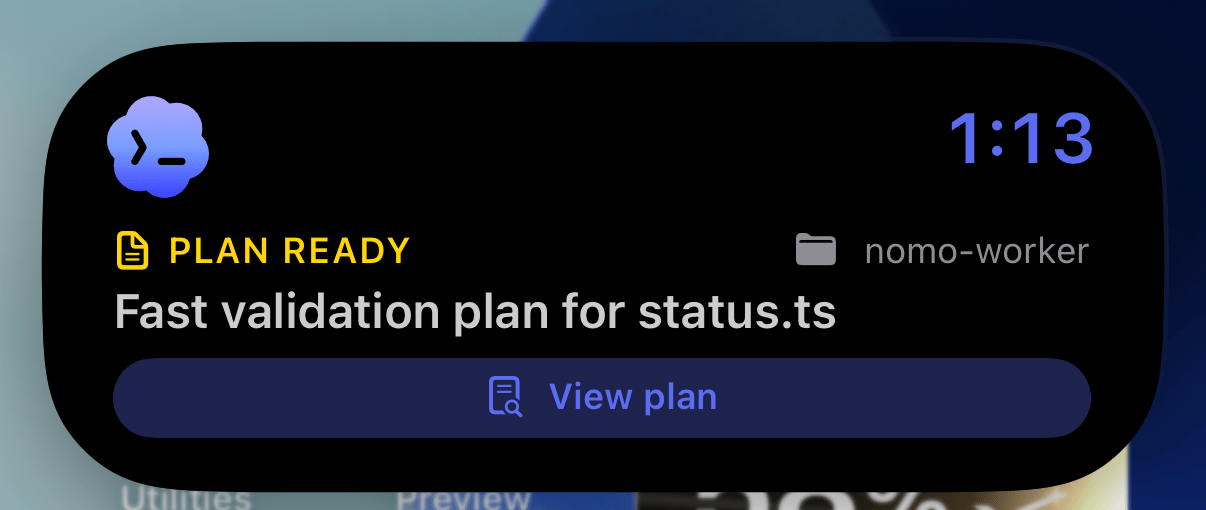
Plan ready
A plan is waiting. Tap View plan to read it.
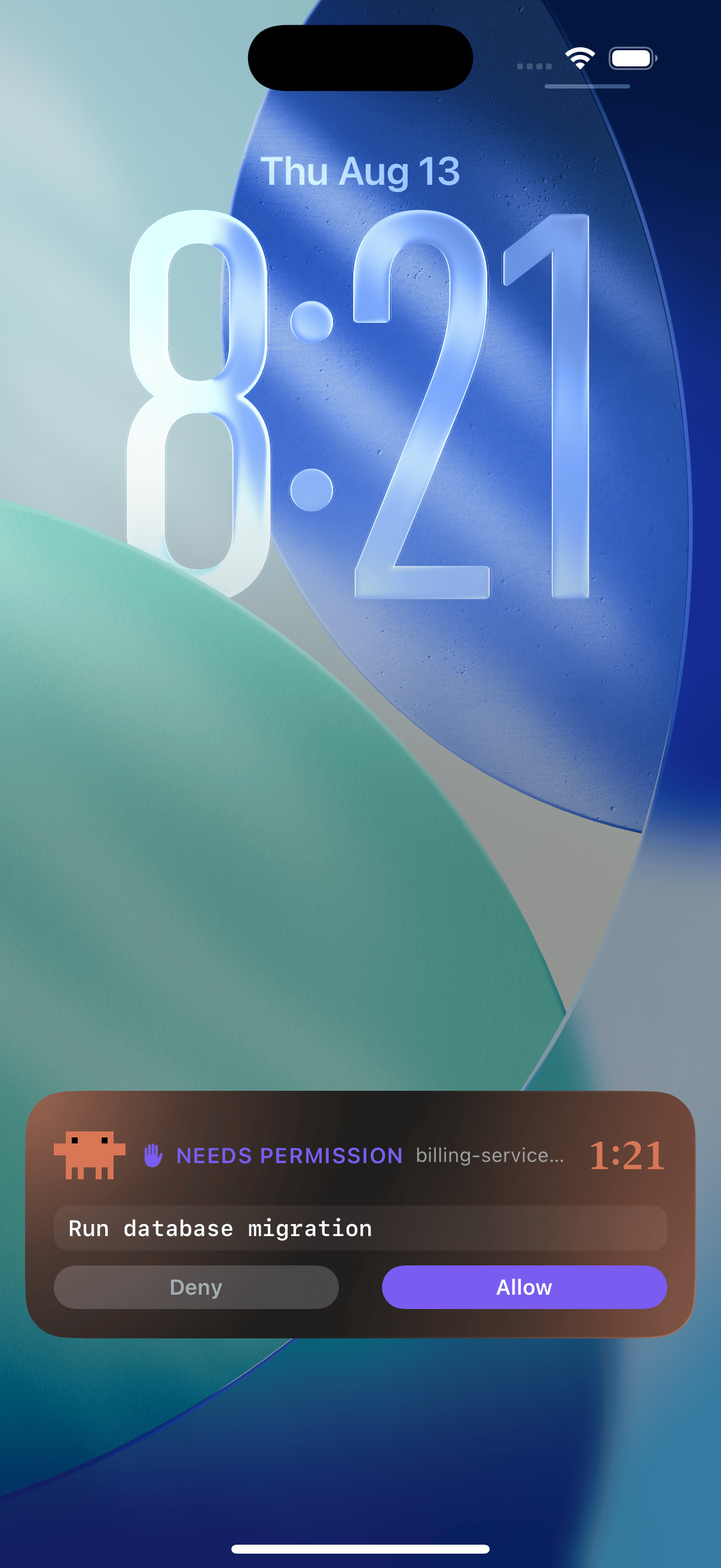
Needs permission
Asking permission. Allow and Deny are right there.
Finished
Done, with the final run time frozen next to it.
Disconnected?
Nomo hasn’t heard from this Mac in 10 minutes. The whole card drains of colour.
Decrypting…
Your phone hasn’t unlocked the update yet. Usually momentary.
Reconnecting
Either your phone doesn’t have the key yet, or the Mac lost the relay and is retrying.
Yellow and violet both show a raised hand. The icon is not the tell — the
colour is. Yellow means look at me and go to your Mac. Violet means answer
me, right here.
While a session is working, the status line alternates between Working and
the model it’s using — ⚡ Fable, ⚡ GPT 5.6 Sol. When the agent reports what it’s
doing, that rides along too: Working · Editing, Working · Running command.
The agent’s mark on the left, and on the right either a timer while it
works, a hand when it wants you, or ✓ 6m when it’s done.
A Claude Code session one minute into its turn.
When another app shares the island, Nomo collapses to a single symbol: the
agent’s mark while working, a hand when it needs you, a green checkmark when
it’s finished.
Fitness has the island; Nomo is the circle on the right, holding a yellow hand.
Touch and hold the island. The agent’s mark and a running clock, then the status,
the session title, its folder, and which computer it’s on. If a permission
prompt is live, the command and the Allow / Deny buttons replace the
lower half. If a plan is waiting, a full-width View plan button appears.
A Codex session with a plan ready. The status word is yellow, the agent's own periwinkle carries the clock, and View plan is the only control.
The same content as expanded, as a card, tinted with the agent’s colour.
There’s more room here, so the status word is written out in full —
NEEDS PERMISSION where the island shortens it to PERMISSION.Everything on the card is tappable and deep-links straight to that session
in the app, so you don’t have to hunt for it.
A permission prompt on the Lock Screen. Answerable without unlocking the phone.
While a session works, the compact side counts up. For the first five minutes
you get live M:SS ticking; after that it settles into 7m, 1h 2m, and past
ten hours into 10h, so the island isn’t flickering at you all day.The clock is anchored to the current turn, not the whole session — it
restarts each time you send a new prompt. When the session finishes, the clock
freezes at the time it actually ended, and heartbeats afterwards can’t inflate
it.If Nomo can’t work out a plausible start time, it shows no timer rather than a
wrong one.
The island shows the last state your Mac sent. After 10 minutes of silence
it stops pretending: the card drains of colour, the timer disappears, and the
status becomes Disconnected?. Your Mac sleeping, losing Wi-Fi, or the terminal
being closed all land here.Opening the Nomo app forces a refresh, and a stale state corrects itself
immediately. The plugin also sends a heartbeat every five minutes on its own, so
a genuinely alive but idle session doesn’t get marked disconnected.Finished sessions never go stale — there’s nothing left to hear from.
If island updates feel sluggish, turn on More Frequent Updates in iOS
Settings → Nomo → Live Activities. That’s Apple’s own budget for how often an
app may repaint the island, and Nomo is written against the default.