> ## Documentation Index
> Fetch the complete documentation index at: https://docs.nomo.gg/llms.txt
> Use this file to discover all available pages before exploring further.

# Status

> See whether your providers are up, and get told when one goes down. No sign-in.

Status needs nothing from you. No account, no plugin. Add the widget and it
starts working.

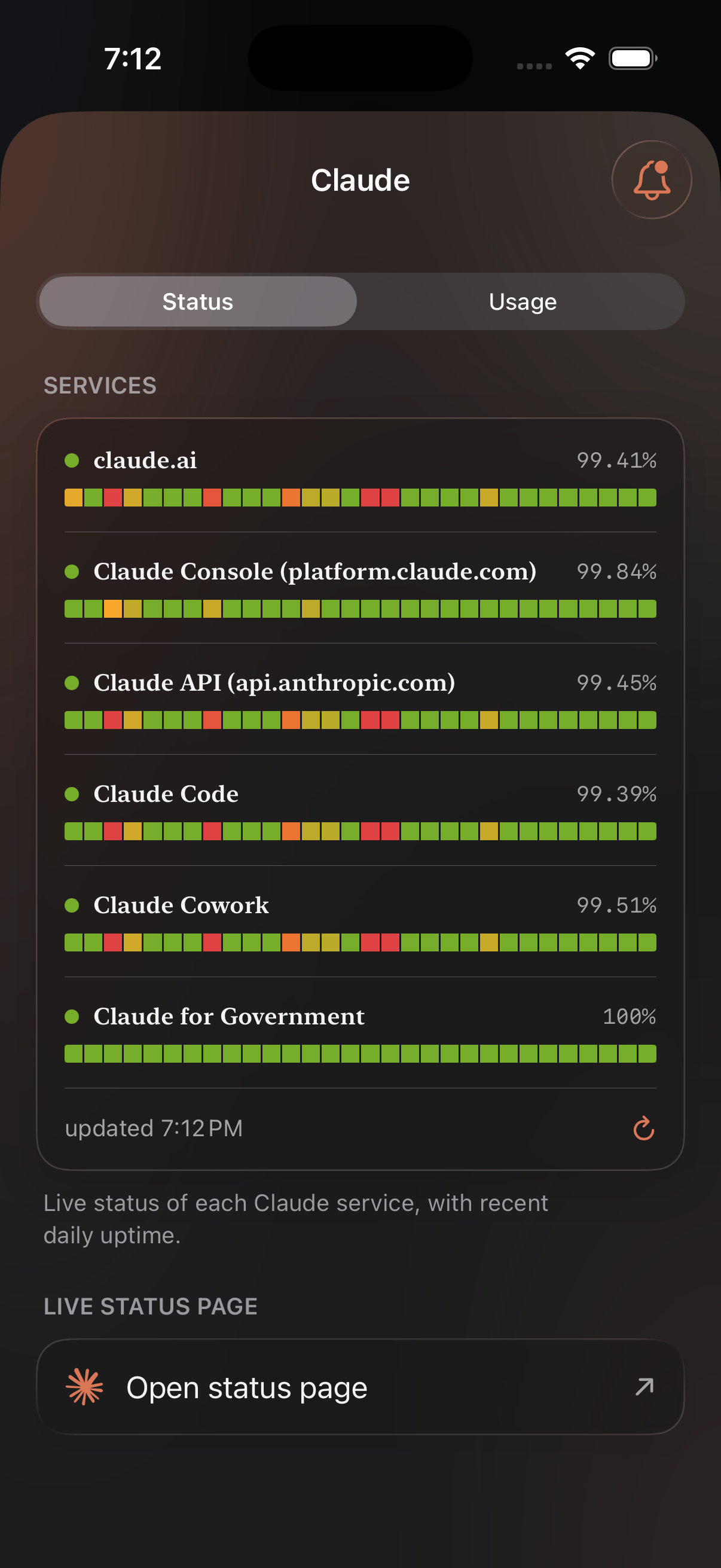
<Frame caption="A provider's Status tab: every service it runs, with recent daily uptime.">
  <div className="device-frame">
    <img src="https://mintcdn.com/nomo-ba73b2e6/E9qWCA0MYZuhukCS/images/claude-status-overview.png?fit=max&auto=format&n=E9qWCA0MYZuhukCS&q=85&s=69776aa553c29d51336a64bea278e2ae" alt="Nomo's Status tab for Claude, listing each service with its state and uptime history" width="1206" height="2622" data-path="images/claude-status-overview.png" />
  </div>
</Frame>

## Widget

<Card title="Widget" href="/widget" icon="puzzle-piece" horizontal>
  Two short clips — putting it on your Home Screen, then pointing it at a
  service.
</Card>

## Notifications

<Card title="Notifications" href="/notifications" icon="bell" horizontal>
  Notify you the moment a provider goes down — and again when it recovers.
</Card>
